
Home
Game Servers
Locations
Support
Game server Wiki
FAQ
Contact
News
Company
基於特定商業交易法的標示
About Us
Affliate
Client Portal
G
A
M
E
P
A
N
E
L
Home
Game Servers
Locations
Support
Game server Wiki
FAQ
Contact
News
Company
基於特定商業交易法的標示
About Us
Affliate
Client Portal
View Categories
Home
Game-Server Wiki
ARK Survival Evolved 地圖更改方法
目錄
ARK SvaivalEvolved - 地圖變更方法
1. 前提條件
2. 修訂歷史
3. 目錄
4. 地圖變更
5. 伺服器重啟
V Rising Server
Satisfactory Server
7Days to Die Server
Project Zomboid
HumanitZ
SOUL MASK
7Days to Die
V Rising
Myth of Empires
Enshrouded
RUST
Valheim
ARMA3
PALWORLD
Conan Exiles
ARK SvaivalEvolved – 地圖更改方法
1. 前置條件
請登入遊戲面板。 遊戲面板的登入方法請
參考此處
2. 修訂歷史
1.0:
建立日期: 2024/1
更新內容: 初版建立
建立者: BESTNET-GSERVER
3. 目錄
1. 前置條件
2. 修訂歷史
3. 目錄
4. 地圖更改
5. 伺服器重新啟動
4. 地圖更改
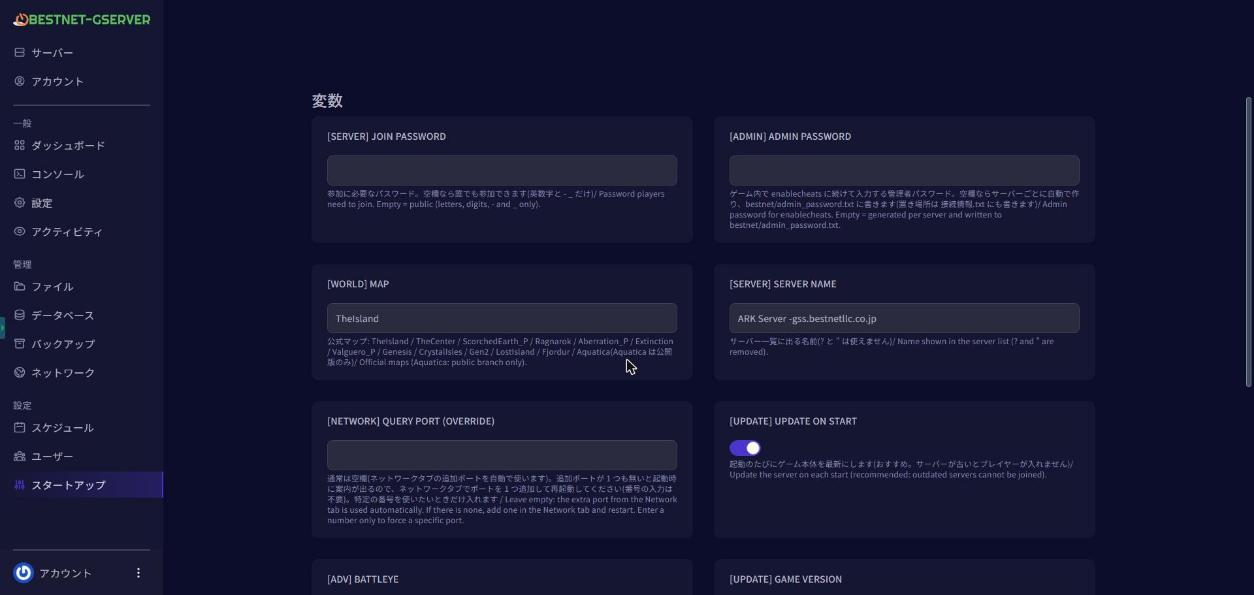
可從遊戲面板輕鬆更改地圖。 預設設定為TheIsland,但可透過將其設定為下列任一選項並重新啟動伺服器來更改地圖。 TheIsland, TheCenter, Ragnarok, ScorchedEarth_P, Aberration_P, Extinction, Valguero_P, Genesis, CrystalIsles, Gen2, LostIsland, Fjordur ※某些地圖可能因記憶體不足而導致啟動失敗。在這種情況下,請考慮升級您的套餐。※ 圖中示例顯示已更改為Genesis 2。
5. 伺服器重新啟動
轉到遊戲面板的Console選項卡,並”重新啟動”伺服器。
如有其他不明之處,請提交工單。
Scroll to top
繁中
日本語
English
한국어
简体中文
繁體中文
✓
