Home
Game Servers
Locations
Support
知识库
FAQ
Contact
News
Company
基于特定商业交易法的标示
About Us
Affiliates
Client Portal
G
A
M
E
P
A
N
E
L
Home
Game Servers
Locations
Support
知识库
FAQ
Contact
News
Company
基于特定商业交易法的标示
About Us
Affiliates
Client Portal
View Categories
Home
Game-Server Wiki
HumanitZ
HumanitZ服务器死亡惩罚修改方法
HumanitZ服务器死亡惩罚修改方法
Listen
0:00
/
0:41
1×
Copy page
Copy page
Copy this page as Markdown for LLMs
View as Markdown
Open this page as plain Markdown
(opens in a new tab)
Open in ChatGPT
Ask questions about this page
(opens in a new tab)
Open in Claude
Ask questions about this page
(opens in a new tab)
Open in Google AI Studio
Ask questions about this page (Google account required)
(opens in a new tab)
目录
如何在HumanitZ服务器上更改死亡时的惩罚 1. 登录游戏面板。
2. 停止服务器。
3. 转到[启动]标签页。
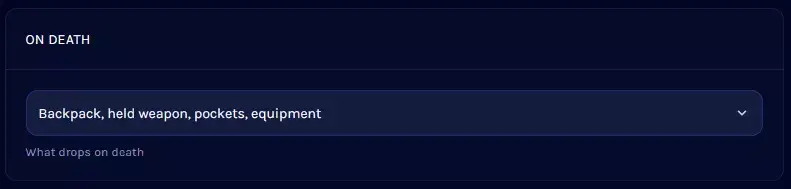
4. 找到[死亡时]部分。
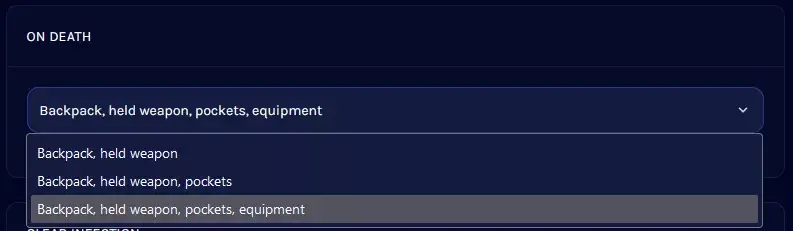
5.打开下拉菜单,选择所需的惩罚。
6. 启动服务器。
V Rising 服务器
Satisfactory 服务器
7Days to Die 服务器
Enshrouded
HumanitZ
SOUL MASK
7Days to Die
V Rising
Myth of Empires
PALWORLD
RUST
Valheim
ARMA3
Project Zomboid
Conan Exiles
如何在HumanitZ服务器上更改死亡时的惩罚
1.
登录游戏面板
。
2.
停止服务器。
3.
转到
[启动]
标签页。
4.
找到
[死亡时]
部分。
5.
打开下拉菜单,选择所需的惩罚。
注意
此设置无法完全禁用物品掉落。玩家必定会掉落
背包
和
持有的武器
。
6.
启动服务器。
如何在HumanitZ服务器中更改昼/夜的长度
在HumanitZ服务器上更改PvP设置的方法
Scroll to top
简中
日本語
English
한국어
简体中文
✓
繁體中文