---
title: HumanitZサーバーでシーズン設定を変更する方法
url: "https://gss.bestnetllc.co.jp/docs/humanitz%e3%82%b5%e3%83%bc%e3%83%90%e3%83%bc%e3%81%a7%e3%82%b7%e3%83%bc%e3%82%ba%e3%83%b3%e8%a8%ad%e5%ae%9a%e3%82%92%e5%a4%89%e6%9b%b4%e3%81%99%e3%82%8b%e6%96%b9%e6%b3%95/"
updated: "2025-01-20"
category: HumanitZ
---

# HumanitZサーバーでシーズン設定を変更する方法

#### **HumanitZサーバーでシーズン設定を変更する方法**
**1.**[ゲーム パネル](https://gsv.bestnetllc.co.jp/)にログインします。

#### **2.** サーバーを**停止します。**
![](https://gss.bestnetllc.co.jp/wp-content/uploads/2024/06/サーバーを起動します。-2.png)

#### **3. [****Start up]**タブに移動します。
![](https://gss.bestnetllc.co.jp/wp-content/uploads/2024/06/「スタートアップ」タブに移動します。.png)

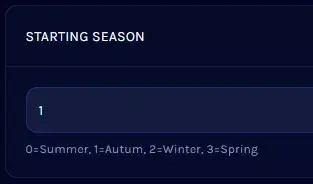
#### **4. ****[STARTING SEASON]**セクションを見つけます。
![](https://gss.bestnetllc.co.jp/wp-content/uploads/2024/09/STARTING-SEASON.webp)

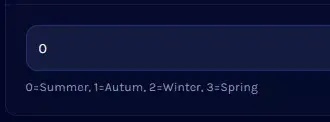
#### **5.**一致する値を入力して、目的のシーズンに変更します。****![](https://gss.bestnetllc.co.jp/wp-content/uploads/2024/09/一致する値を入力.webp)

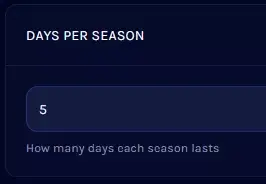
#### ** 6. ****[DAYS PER SEASON]**セクションに進みます。
![](https://gss.bestnetllc.co.jp/wp-content/uploads/2024/09/DAYS-PER-SEASON.webp)

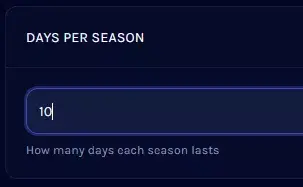
#### **7.**各シーズンの希望する日数を入力します。
![](https://gss.bestnetllc.co.jp/wp-content/uploads/2024/09/希望する日数.webp)

#### **8.** サーバーを**起動します。
![](https://gss.bestnetllc.co.jp/wp-content/uploads/2024/06/サーバーを起動します。-2.png)**