
A step-by-step guide to your BESTNET-GSERVER Conan Exiles Enhanced server — from ordering to configuring and joining — written so that first-time users can follow it without getting lost.
- v2.0
- 2026-08 — Fully revised for Conan Exiles Enhanced. Reorganised the connection methods into three, and added how to register the server in the Steam server list (query port), how to install mods, and how to edit the configuration files directly.
- v1.0
- Initial version
Ordering and signing in to the game panel
Once your payment is complete, the server is built automatically and delivered fully set up. It is usually ready within a few minutes to a few tens of minutes, and we notify you by e-mail when it is done.
Everything is managed from the game panel, which you use in your browser.
- Sign in to the game panel with the details in your order confirmation e-mail.
- After signing in, select your Conan Exiles server.
- On the “Console” screen you can see the startup status and the logs.
The four settings to configure first
Server settings are configured on the “Startup” screen of the game panel. What you type is saved automatically and applied the next time the server starts.
Start with these four.
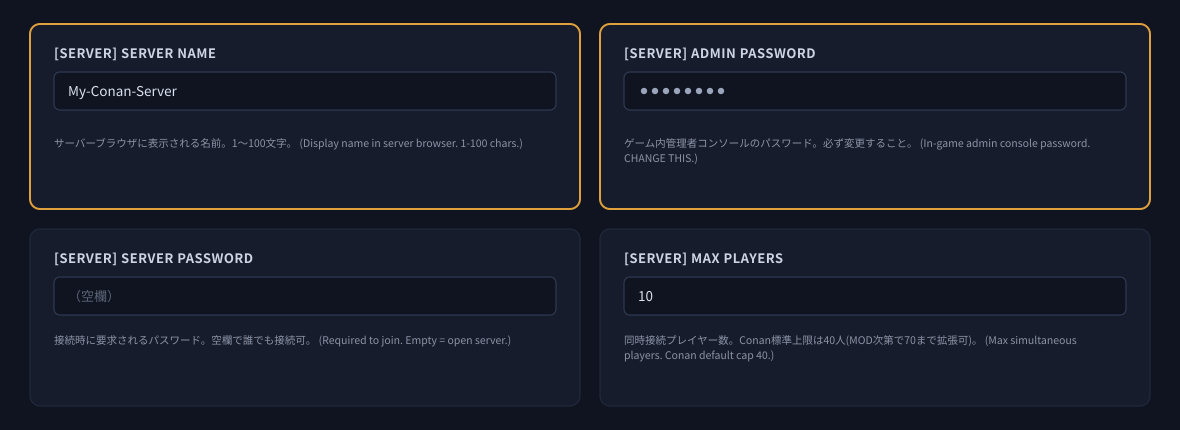
| Setting | What it does |
|---|---|
| [SERVER] Server Name | The name shown in the server browser. 1–100 characters. A name your friends can recognise makes the server easier to find in the in-game list. |
| [SERVER] Admin Password | The password for the in-game admin console. Be sure to change it. |
| [SERVER] Server Password | The password required to join. Leave it empty and anyone can join — the server becomes public. |
| [SERVER] Max Players | How many players can be connected at once. The standard cap for Conan Exiles is 40 (some mods can raise it further). Choose a number that suits your plan. |
The following settings are also commonly used.
- [SERVER] Server Region — the region of the server (0=Europe / 1=North America / 2=Asia / 3=Oceania). If you run it in Japan, leaving it at 2 is fine.
- [SERVER] Server Type — the server category (0=PvE / 1=PvE-C / 2=PvP).
- [GAMEPLAY] Nudity Level — the level of nudity (0=off / 1=partial / 2=full). If you run a public server, please also consider the age of the people joining.
- [SERVER] サーバーメッセージ(MOTD) (server message) — a notice shown to everyone who joins. Leave it empty and nothing is shown.
Starting the server
Once you have finished configuring, press “Start” on the “Console” screen of the game panel.
- The first start downloads the game data, so it takes a while to finish.
- When the startup log finishes in the console and the status turns to “Online”, the server is ready.
- After changing a setting, restart the server to apply it.
Joining the server
There are three ways to join. The most reliable is method 2 (in-game direct connect).
Method 1: find it in the in-game server browser
Start Conan Exiles and search the server list for your server name. Filter by the [SERVER] Server Name you set.
Method 2: in-game direct connect (recommended)
Enter the IP address and the game port into the in-game direct connect field. You can find the numbers in your setup e-mail, or on the “Network” screen of the game panel.
Method 3: register it in the Steam server list
You can also register the server in the Steam server list (favourites). What you enter here is not the game port but the “query port”.
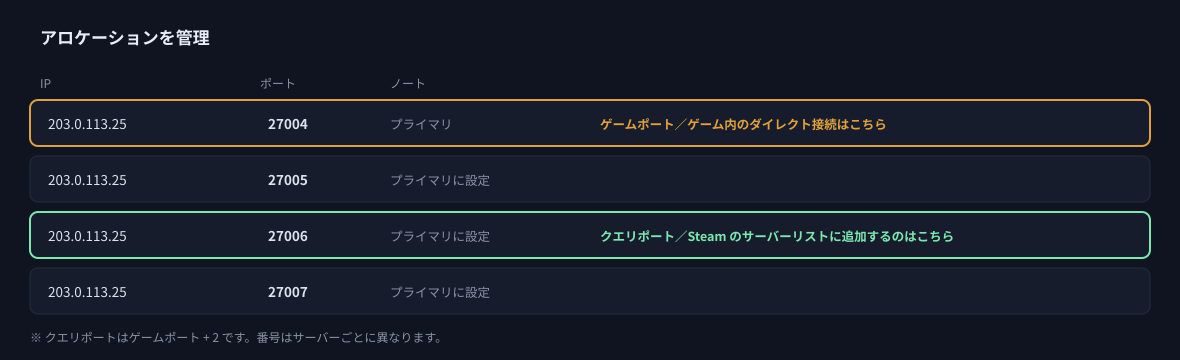
| Purpose | Port to use | Example |
|---|---|---|
| In-game direct connect | Game port (the one marked “Primary” in the panel) | 203.0.113.25:27004 |
| Steam server list | Query port = game port + 2 | 203.0.113.25:27006 |
Installing mods (Steam Workshop)
You can use mods from the Steam Workshop. Just enter the mod IDs in the game panel — downloading and updating are handled on the server side automatically.
How to install
- Open the Steam Workshop page of the mod you want and note the number at the end of the URL (the mod ID).
Example:...?id=880454836→ the mod ID is880454836 - On the “Startup” screen of the game panel, enter the mod IDs into [MODS] Workshop Mods List, separated by commas.
Example:880454836,1369802940 - Restart the server. The mods are downloaded and loaded automatically on start.
Automatic mod updates
With [MODS] Mod Auto Update enabled, mod updates are fetched on the server side automatically as well.
Checking whether a mod is the cause
If the server does not start, or nobody can join, enable [MODS] Safe Mode (skip all mods) and restart. The server boots without loading any mods, so you can tell immediately whether a mod is the cause. The mod files themselves are kept, so turning it back off restores the previous state.
Fine-tuning the settings
Conan Exiles has a great many server settings — experience rates, harvest amounts, the length of day and night, how strong NPCs are, how buildings decay, and more. The everyday ones can be adjusted from the “Startup” screen of the game panel, and the finer ones from the configuration files.
You can use the panel, the files, or both
If you leave an item in the game panel empty, that item uses exactly what is written in the configuration file. You can enter only the items you want to manage from the panel and fine-tune the rest in the files.
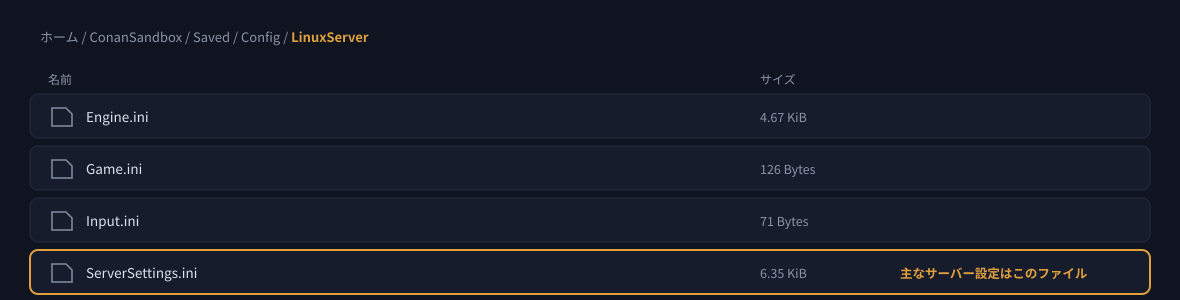
The main server settings are in ServerSettings.ini. You can edit it directly from the “Files” screen of the game panel, or over FTP.
The main groups you can adjust from the panel
- [PROGRESS] — experience rates (overall / killing / harvesting / crafting / over time)
- [WORLD] — harvest amounts, resource respawn speed, day and night length, crafting time, fuel burn
- [SURVIVAL] — hunger and thirst, stamina cost, durability loss, item spoil rate
- [COMBAT] — damage dealt and taken by NPCs and players, NPC respawn
- [BUILDING] — building damage, land claim radius, decay time
- [PVP] — PvP settings such as raid hours
Backups and scheduled restarts
Backups
You can create and restore backups from the “Backups” screen of the game panel. How many generations you can keep depends on your plan (3–30).
See Restoring from a backup for the steps.
We recommend a scheduled restart
We recommend setting up an automatic restart once a day. The latest game update is applied automatically when the server restarts, so you always stay up to date. Choose a time when few people are playing.
See How to set a recurring schedule on your game server for how to set it up.
Troubleshooting
| Symptom | What to check |
|---|---|
| Cannot join the server after a game update | The client and the server are on different versions. Restart the server from the game panel. It fetches the latest version on start. Fetching can take a few minutes, and you cannot connect until it finishes. |
| Cannot register the server in the Steam server list | Check that you are not entering the game port. What you register with is the query port (game port + 2). |
| Cannot join, or the server will not start, after adding mods | Enable [MODS] Safe Mode (skip all mods) and restart to see whether a mod is the cause. The people joining need the same mods, and the mods need to support Enhanced. |
| A setting was changed but nothing happened | Settings are applied when the server starts. Please restart it. |
| A password was changed but the old one still seems to apply | The same — a restart is required. Please also tell the new password to the people joining. |
Next steps
- Logging in to the game panel and feature overview — how to use each screen of the panel
- Restoring from a backup
- How to share access to the game panel — manage the server together with your friends
- How to upgrade or downgrade a game server


