
Contents
STEP1. Log in to the Game Panel.
For instructions on how to log in, please see here.
Revision History
- 2.0:
- Update Date: 2026/10/06
- Update Details: The old procedure asked you to stop the server and then type a command in the console, which cannot be done. Revised to change the setting on the Startup tab. Corrected the wrong default value (600 seconds → 60 seconds).
- Updated by: BESTNET-GSERVER
- 1.0:
- Creation Date: 2024/1
- Update Details: Initial version created
- Created by: BESTNET-GSERVER
| Note | Change the auto-save interval with SAVE INTERVAL on the “Startup” tab. This value is applied every time the server starts. You can also change it from the console, but that is for applying the change to a running server on the spot. Use the Startup tab if you want the change to be permanent. |
STEP2. Stop the server with “Stop”.
Click “Stop” in the upper right of the server page and wait until the server stops.
| Note | Use “Stop” to stop the server. It saves the world before shutting down (the console shows Saving complete → Config Saved). “Kill” forces the server to quit without saving, so recent progress is lost. Use it only as a last resort, when “Stop” does not finish after waiting a few minutes. |
STEP3. Select “Startup” from the left menu.
Once the server has stopped, open “Startup” from the left menu.
STEP4. Enter the number of seconds in [SAVE INTERVAL].
In the SAVE INTERVAL field, enter the save interval in seconds.
| Note | The default value is 60 seconds. A shorter interval saves more often, but the server lags for a moment each time it saves. A longer interval means more play time is rolled back if the server ever goes down. |
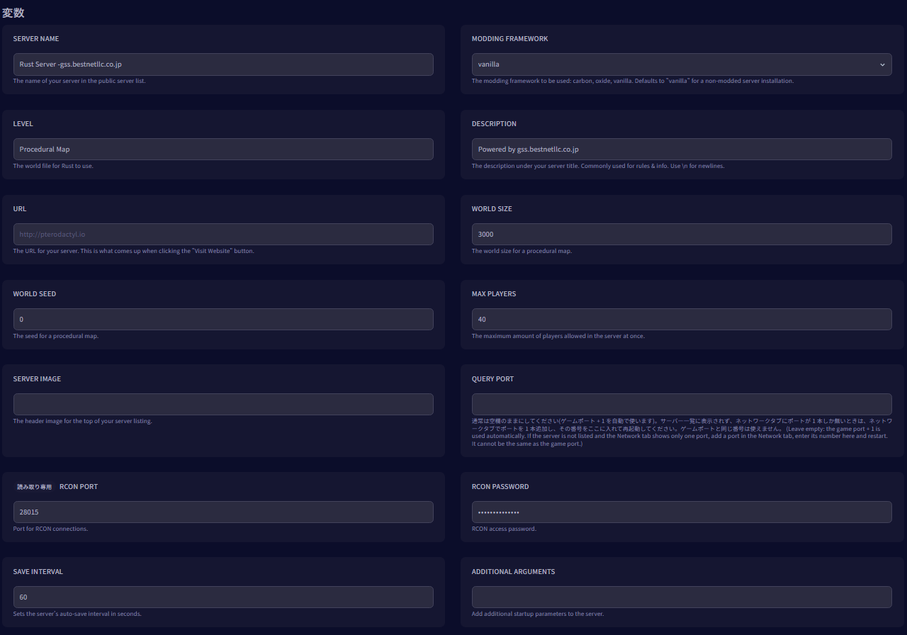
STEP5. Start the server with “Start”.
After entering the value, return to the server page and click “Start”. The new value is loaded when the server starts.
| Note | After you press the start button, it takes about 3 minutes when a saved world is loaded before you can join the game. The panel keeps showing “Starting” during that time. This is not a malfunction. |
Additional note: applying the change to a running server
If you want to change the value without stopping the server, you can also change it from the console.
| Important | Console commands only reach the server while it is running. If you stop the server and then open the console, the command will not run. To change the value from the console, keep the server running while you work. |
- Open “Console” from the left menu.
- Type
server.saveinterval <seconds>and press Enter. - Type
server.writecfgand press Enter, and the setting is also written to the configuration file.
This completes the procedure for changing the auto-save interval on your Rust server.


