
This guide explains how to delete your Client Portal account itself and erase the information we hold about you. Deleting your account terminates every service you are using, and you will no longer be able to log in to the portal. Please read this before you start.
Revision History
- v1.0
- October 13, 2026 — First edition
Important Notices
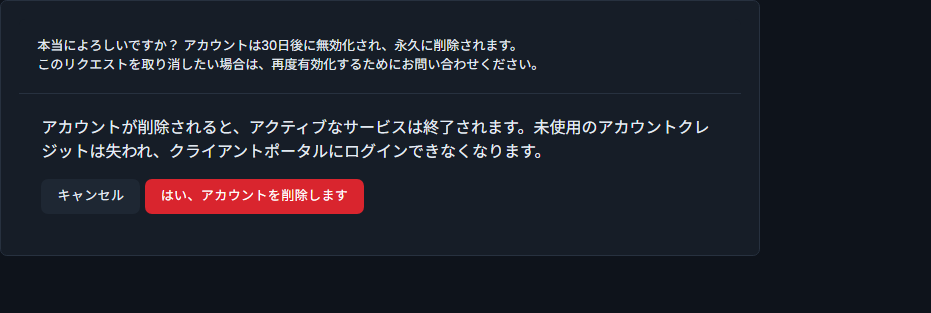
When you press the delete button, a confirmation screen appears before the request is finalized. It states the following. All of these actually happen, so please read them carefully.
- Every service you are using will be terminated. Your game server data will be lost as well.
- Any unused account credit (balance) will be forfeited.
- You will no longer be able to log in to the Client Portal. Invoices and other records you viewed after logging in will no longer be accessible from the portal.
Before You Delete
An account deletion cannot be undone. Please complete the following four items first.
1. Save your game server data on your own device
Deleting your account terminates the services you are using, and in addition to the server itself, its files and its settings, every backup stored on the game panel is deleted as well. Leaving backups on the panel is not enough to keep them. Create a backup from “Backup” in the game panel, download that file to your own device, and then proceed.
2. Obtain a copy of your registered information
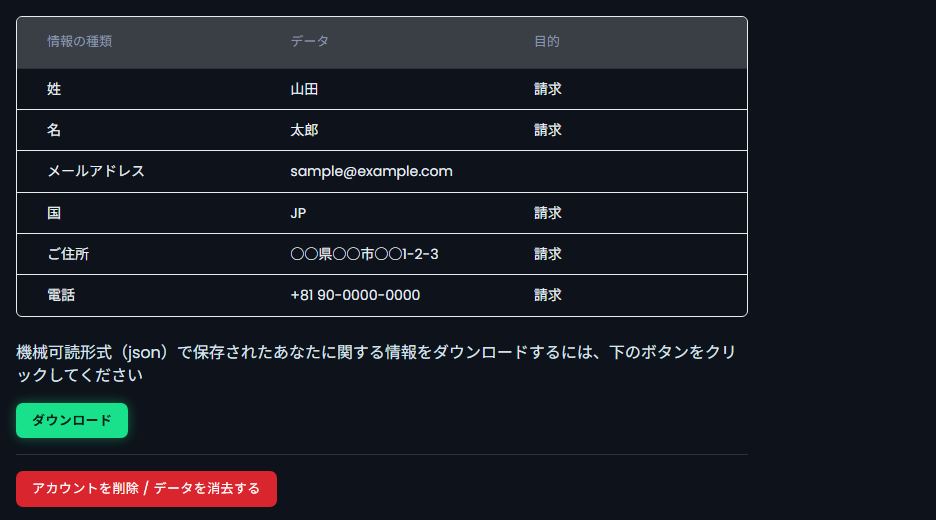
The registered information we hold can be downloaded from the Client Portal in a machine-readable format (JSON). If you need it, please obtain it before you start. After deletion you can no longer log in to the Client Portal, so you will not be able to download it from this screen.
3. Save your invoices and receipts
After deletion you can no longer log in to the portal, and past invoices and receipts can no longer be obtained. If you need them for expense processing or bookkeeping, download every relevant invoice from the “Billing” (請求) menu and save them on your own device.
4. Decide whether to use up your balance
Credit (balance) deposited into your account cannot be refunded or withdrawn, under “Payment” in our Terms of Service. Unused credit is forfeited when your account is deleted, so if you have a balance, please decide what to do with it before you start.
Deletion Procedure
STEP 1: Log in to the Client Portal
Go to the Client Portal and log in with your registered email address and password.
STEP 2: Open “Overview” under “Account Details”
From the menu, open “Account Details” (アカウントの詳細) and click “Overview” (概要) inside it. A list of the information we hold is displayed.
STEP 3: Press “Delete Account / Erase Data”
Pressing the red “Delete Account / Erase Data” (アカウントを削除 / データを消去する) button brings up a confirmation screen.
After Deletion
Your account is deactivated after 30 days and then permanently deleted. Once the account is deleted:
- The services you are using are terminated.
- Any unused account credit is forfeited.
- You can no longer log in to the Client Portal.
If you want to withdraw the request
You cannot withdraw it yourself. Please request reactivation of your account through a support ticket. If you wish to withdraw the request, please contact us as soon as possible.
Only if you cannot log in to the portal, please contact us through the contact form. Replies through the form can take three business days or more.
How the information we hold is handled
The account itself is deactivated and deleted after 30 days. Erasure of the personal information we hold takes place 60 days after you have canceled all services, as provided under “Handling of Personal Information” in our Terms of Service. Please note that the starting point is different.
Frequently Asked Questions
I want to stop just one service. Do I need to delete my account as well?
No. The per-service cancellation procedure is enough. See How to Cancel Your Game Server Service for the steps.
What happens to my balance?
Unused account credit is forfeited. Credit deposited into your account cannot be refunded or withdrawn under our Terms of Service.
What if I want to use the service again after deleting?
Once the account has been completely deleted it cannot be restored. If you would like to use our service again, please consult our support team.
Can I erase only part of my information?
You can correct your registered details from “Edit Details” (詳細の編集) under “Account Details”. If you would like to suspend the use of, or erase, specific information, please consult our support team.


