
Contents
ARK Survival Evolved – How to Enable Crossplay
1. Prerequisites
Please log in to the Game Panel. For instructions on how to log in to the Game Panel, please see here2. Revision History
- 1.0:
- Created: 2024/1
- Update Details: Initial version
- Author: BESTNET-GSERVER
3. Table of Contents
- 1. Prerequisites
- 2. Revision History
- 3. Table of Contents
- 4. Adding Startup Arguments to Enable Crossplay
- 5. Restarting the Server
4. Adding Startup Arguments to Enable Crossplay
You can easily enable this from the Game Panel. Crossplay with Epic Games ARK users will become possible. Enter -crossplay in the [ADV] Additional Launch Arguments field on the Startup tab.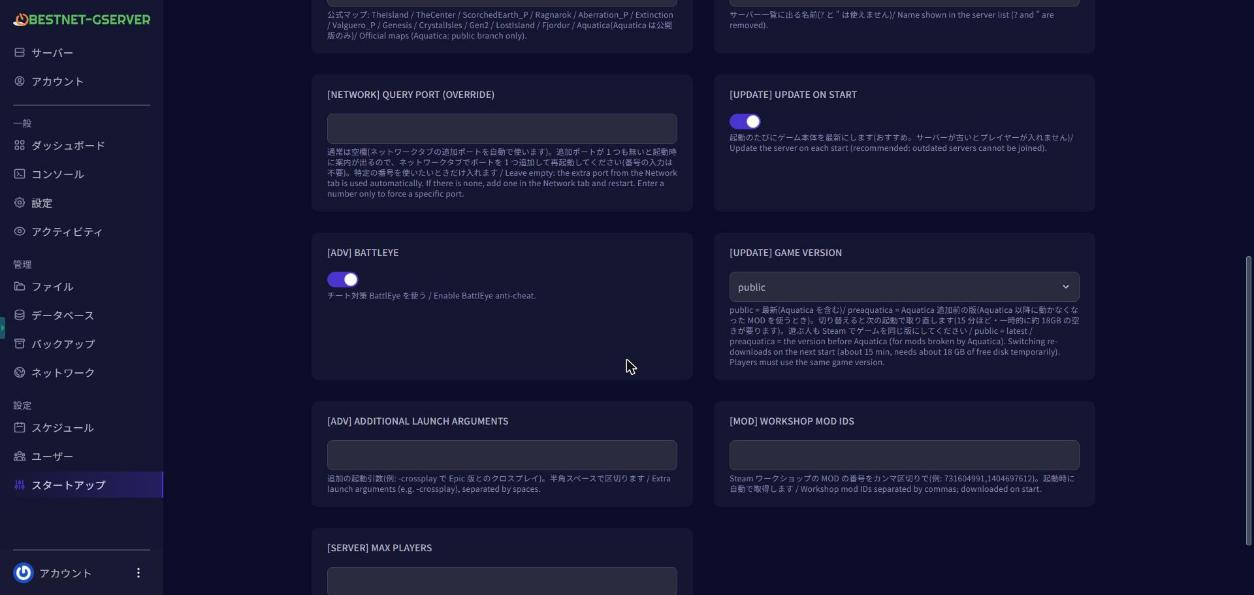
5. Restarting the Server
Navigate to the Console tab in the Game Panel and ‘Restart’ the server. After the restart, the console shows
 [bestnet] Epic 版とのクロスプレイ: 有効. The server software logs in Japanese only; this line means “Crossplay with the Epic edition: enabled”. Players on the Epic edition can find your server in the in-game server list (unofficial), or join using the address shown in the game panel console and in 接続情報.txt. Players on the Epic Games version may not be able to join servers running the Aquatica map, the pre-Aquatica version, or mods. If you have any other questions, please submit a ticket. 


