
This guide walks you through a BESTNET-GSERVER Minecraft Java Edition (Paper) server, from ordering to starting up and joining, with nothing assumed. The two things people trip over first are agreeing to the EULA, which is needed only once, and the port number in the connection address.
- v1.0
- January 2024 — First edition.
- v2.0
- September 2026 — Full rewrite. Added how to tell Java Edition from Bedrock Edition, agreeing to the EULA, the port number in the connection address, the main settings, plugins and mods, backups, and troubleshooting.
This guide is for Java Edition
If you play on a smartphone, Nintendo Switch, PlayStation, Xbox, or the Windows app from the Microsoft Store, you are on Bedrock Edition, which is a different product with a different procedure. Java Edition and Bedrock Edition servers cannot connect to each other either.
If you are not sure which one you have, the launcher will tell you. If you open Minecraft Launcher and start the game from the entry labelled “Java Edition”, you are on Java Edition. If the game is installed as a Microsoft Store app, or the title screen says “Bedrock”, you are on Bedrock Edition.
| What you have | Where to go |
|---|---|
| Java Edition (PC, the Java Edition entry in Minecraft Launcher) | Carry on with this page. |
| Bedrock Edition (phone, Switch, PlayStation, Xbox, Windows app) | Minecraft Bedrock Edition - Initial Setup / Minecraft dedicated servers |
| You want to run a whole Forge modpack | Setting Up a Minecraft Modpack Server / Minecraft: Forge Modpack dedicated servers |
From order to a working server
Once your payment goes through, the server is built automatically. There is nothing for you to do.
- Your order and payment complete.
- The server is built automatically. This normally finishes within a few minutes.
- When the build finishes, a confirmation is sent to your registered email address.
Log in to the game panel
Everything you do with the server happens in the game panel, which runs in your browser.
- Use the details in your order confirmation email to log in to the game panel.
- After logging in, select your Minecraft server.
- The left-hand menu takes you to Console, Files, Backups, Network, Schedules, Startup and so on.
Agree to the Minecraft EULA
A Minecraft server will not run until you have agreed to the Minecraft EULA. You only need to do this once.
The first time you press Start, this line appears in the console and the server stops.
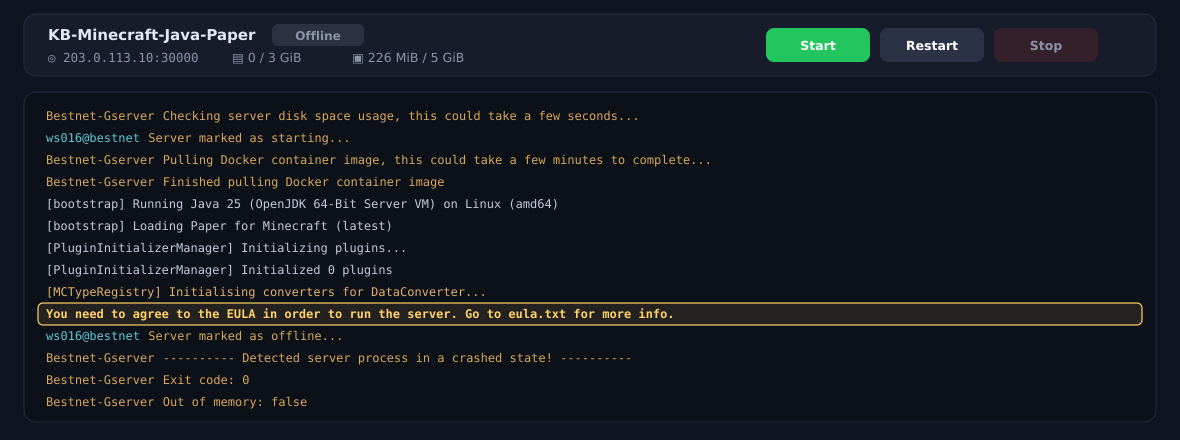
Right after it stops you will also see lines such as Detected server process in a crashed state! and Exit code: 0. The wording is alarming, but nothing is broken. You simply have not agreed yet. Follow either method below and the server starts normally.
Method 1: press the accept button on screen (recommended)
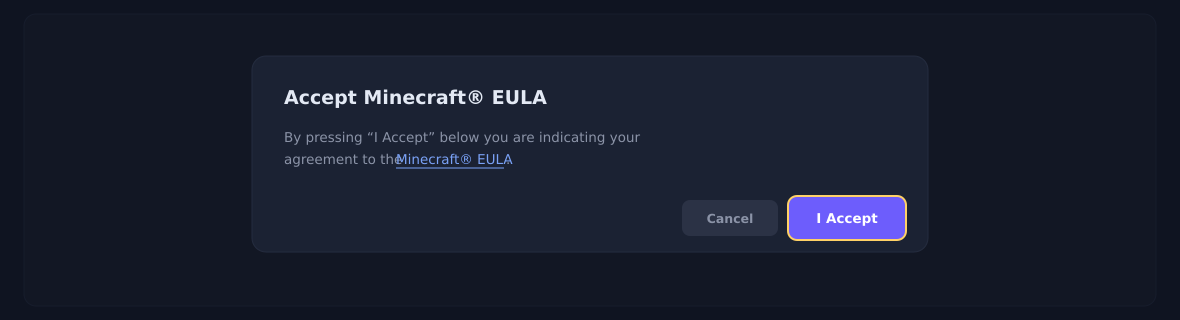
If you start the server with the Console screen open, a dialog titled “Accept Minecraft® EULA” appears after a short while. Read it, then press “I Accept”. Once you accept, the server carries straight on with starting up — there is nothing else to do.
Method 2: edit eula.txt
If you closed the dialog, or you would rather not work from the Console screen, you can agree by editing the file directly.
- Press Start once in the game panel.
- The console shows
You need to agree to the EULA...and the server stops. - Open Files in the left-hand menu.
- Click
eula.txtin the home directory to open it. - Change
eula=falsetoeula=trueand press Save Content. - Press Start again.
eula.txt is created by that first start. On a server that has never been started, eula.txt is not in the file list at all.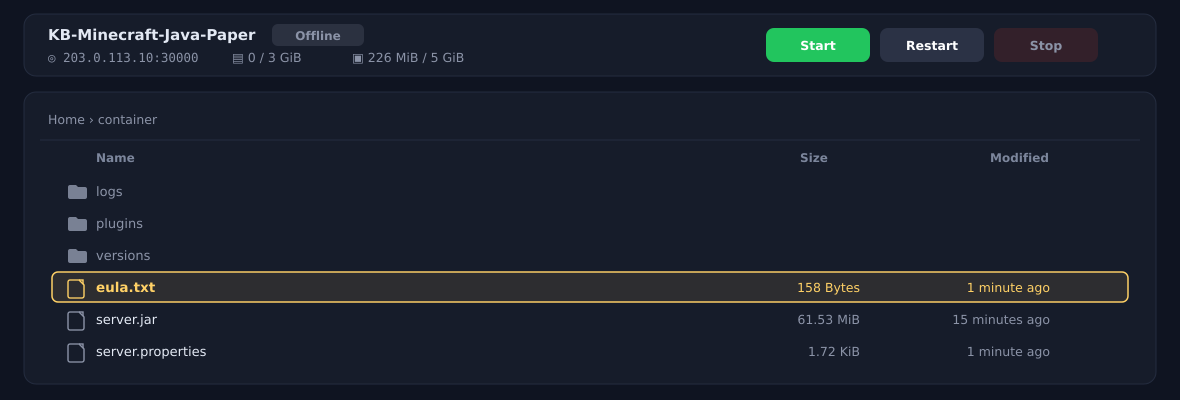
Start the server
Once you have agreed to the EULA, press Start on the Console screen of the game panel.
When this line appears in the console, start-up is finished and players can join.
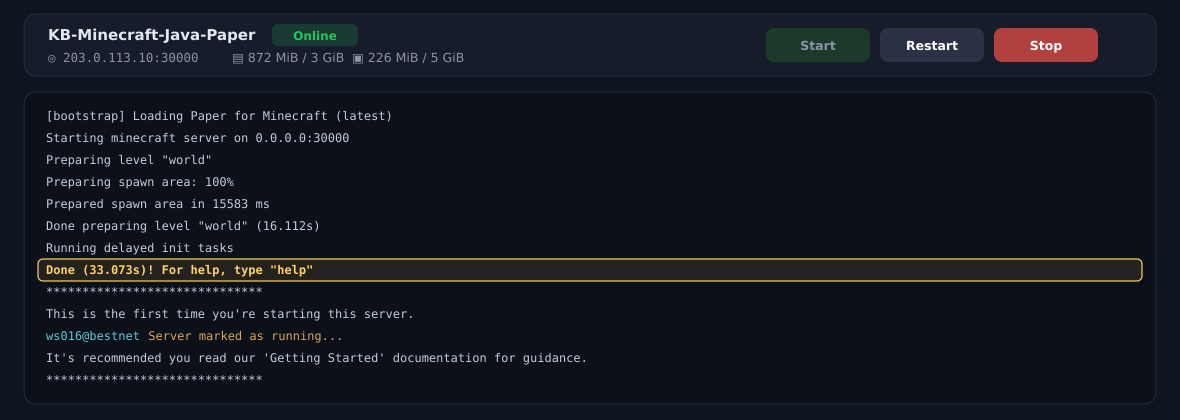
Preparing spawn area is normal progress.stop in the console. Stop the server before editing files — it is safer that way.Join the server
The connection address is shown at the top of the game panel, in the form IP address:port number (for example 203.0.113.10:30000).

Minecraft’s default port is 25565, but we assign each server its own port number. If you enter the address on its own, the game tries to reach port 25565 and you will not get in. Copy the
IP address:port number shown in the panel exactly as it is.- Start Minecraft (Java Edition) and open Multiplayer from the title screen.
- Press Add Server.
- In “Server Address”, enter the address from the panel including the port number.
- Save it, then pick the server from the list and join.
Change the main settings
Server settings such as difficulty and player count live in server.properties, in the home directory on the Files screen. That file is created by the first start.
| Setting | What it does | Default |
|---|---|---|
difficulty | Difficulty (peaceful / easy / normal / hard) | easy |
gamemode | Game mode (survival / creative / adventure / spectator) | survival |
max-players | How many people can play at once | 20 |
white-list | Whitelist (only approved players can join) | false |
pvp | Whether players can attack each other | true |
motd | The description shown in the server list | A Minecraft Server |
view-distance | Render distance (higher is heavier on the server) | 10 |
level-seed | World seed (random when left empty) | (empty) |
spawn-protection | Protected radius around the spawn point | 16 |
server-port. It already holds the port number we assigned. Changing it can stop the server from starting, or stop players from joining.To use the whitelist, set
white-list=true and then run whitelist add <player name> from the console.world folder and start the server; a new world is generated. The old world cannot be brought back, so take a backup first.Plugins and mods
This product runs Paper (compatible with Bukkit and Spigot), so you can add plugins directly. The procedures have their own articles.
- Install any plugin using the plugin management feature on Minecraft JAVA-Paper Edition
- Easy Setup of MOD Packs on Minecraft JAVA-Paper Edition
- How to Set Up Voice Chat on Forge/Fabric/Spigot Minecraft Servers
Backups
Backups are something you create yourself, and none are taken by default. If your world matters to you, it is worth setting this up early.
- Procedure for setting a regular schedule on a game server — fix a day and time and backups are taken automatically
- Restoring from a backup — how to put one back, and what to watch for
If something does not go to plan
| Symptom | What to check |
|---|---|
| I press Start and it stops on its own | You may not have agreed to the EULA yet. See Agree to the Minecraft EULA. Exit code: 0 and crashed state do not mean anything is broken. |
| I cannot join / the server is not found | Check that you entered the port number too. See Join the server. |
| “Server is out of date” or a version mismatch | Match the server to the version of the game you are running. Set the server side in MINECRAFT_VERSION on the Startup screen, then restart. |
| Start-up is taking a long time | The first start generates the world and takes a few minutes. Preparing spawn area is normal progress. |
| I cannot join from Bedrock Edition | Java Edition and Bedrock Edition cannot connect to each other. Check which edition you have — see This guide is for Java Edition. |
| The server stopped starting after I added a plugin | Remove the plugin you added last from the plugins folder and try again. It may not match your server version. |
| It will not start whatever I do | See Reinstallation procedure when the server fails to start. Take a backup before reinstalling. |
Next steps
- Install a plugin — plugin management on Paper
- Logging into the Game Panel and Feature Overview — how the panel works
- Procedure for setting a regular schedule on a game server — automatic restarts and backups
- Restoring from a backup
- Minecraft dedicated servers — plans and pricing


