
Overview
Myth of Empires join notifications notify existing players when new players join the game, promoting community interaction and awareness.
These notifications can foster a welcoming environment by recognizing and greeting new players, encouraging socialization and friendship among players.
Join notifications contribute to a sense of community and connection within the Myth of Empires server environment by providing real-time updates about player activity.
| Note | The player’s name appears before the join notification. |
How to Enable Player Join Notifications on a Myth of Empires Server
1. Log in to https://gsv.bestnetllc.co.jp/ Game Panel.
2. Stop your server.

3. Go to the [Startup] tab, which is the third from the top right.

4. In the [EXTRA FLAGS] field, enter the following: -NoticeAllEnable=true -NoticeEnterServer="has joined the server" -NoticeLeaveServer="has left the server"
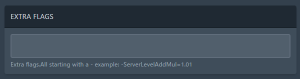
| Note | Multiple additional flags are separated by spaces. |
5. Start your server.


