
Contents
ARK Survival Evolved – How to Change Server Admin Password
1. Prerequisites
Please log in to the Game Panel. For instructions on how to log in to the Game Panel, please see here2. Revision History
- 1.0:
- Creation Date: 2024/1
- Update Details: Initial Version
- Created by: BESTNET-GSERVER
3. Table of Contents
- 1. Prerequisites
- 2. Revision History
- 3. Table of Contents
- 4. Changing the Server Admin Password
- 5. Server Restart
4. Changing the Server Admin Password
You can easily change the admin password from the Game Panel. The admin password is generated automatically for each server. You can check the current value by opening the bestnet folder under Files in the game panel and reading admin_password.txt. To use a value of your own, enter it in the [ADMIN] Admin Password field on the Startup tab (letters, digits, – and _ only). The value you enter takes priority.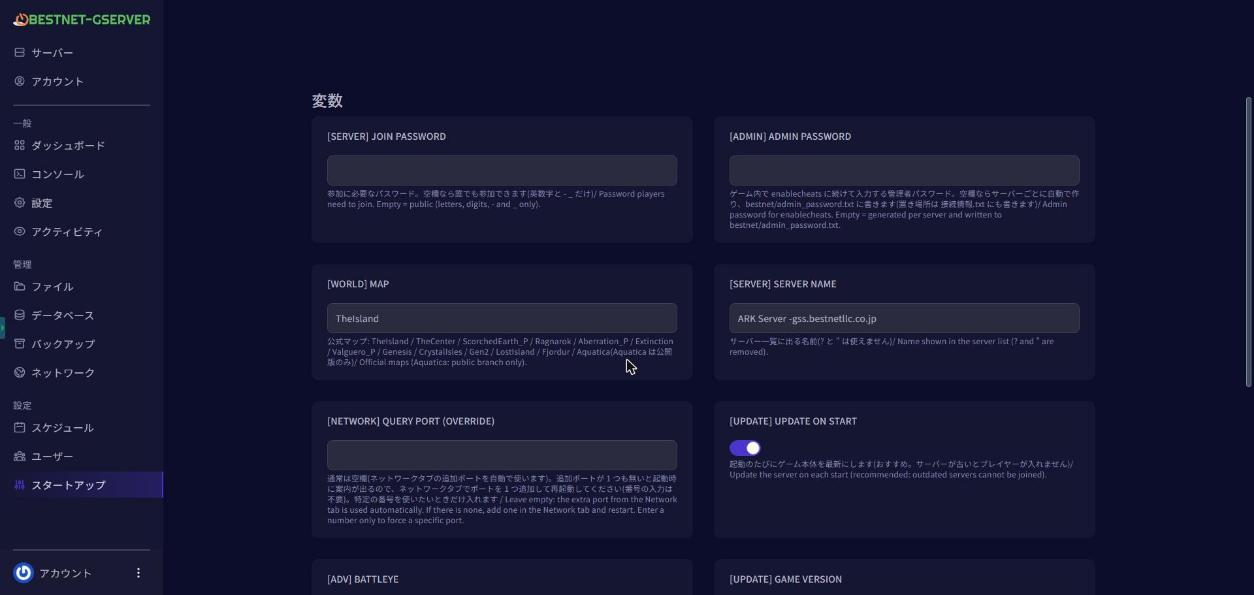
5. Server Restart
Navigate to the Console tab in the Game Panel and ‘Restart’ the server. If you have any other questions, please submit a ticket.


