
Alongside our own backups, Palworld keeps generation backups that the game itself creates automatically. They do not appear on the Backups screen of the game panel, so they are easily overlooked. A save you deleted by mistake, or a character lost in hardcore mode, can often be recovered if one of these generations is still there.
There are two kinds of backup
Both are called backups, but they are made by different things and kept in different places. Telling them apart is the first step.
| Type | Who creates it | Where it lives | Shown on the panel Backups screen |
|---|---|---|---|
| Panel backup | You, manually or on a schedule | Managed by the game panel | Yes |
| Palworld generation backup | Created automatically by the game | Inside the save-data folder on your server | No |
Note that on servers created or reinstalled on or after 12 September 2026, panel backups do not contain the Palworld generation backups. The generation backups stay on the server exactly as before, so you can still use them with the steps on this page.
Which one to use
It depends on the point in time you want back.
- You have a panel backup from before that moment → restore it from the panel Backups screen (see the related documents below).
- You have no panel backup from before that moment → check the generation backups described below.
Finding the generation backups
From File in the game panel, follow these folders in order.
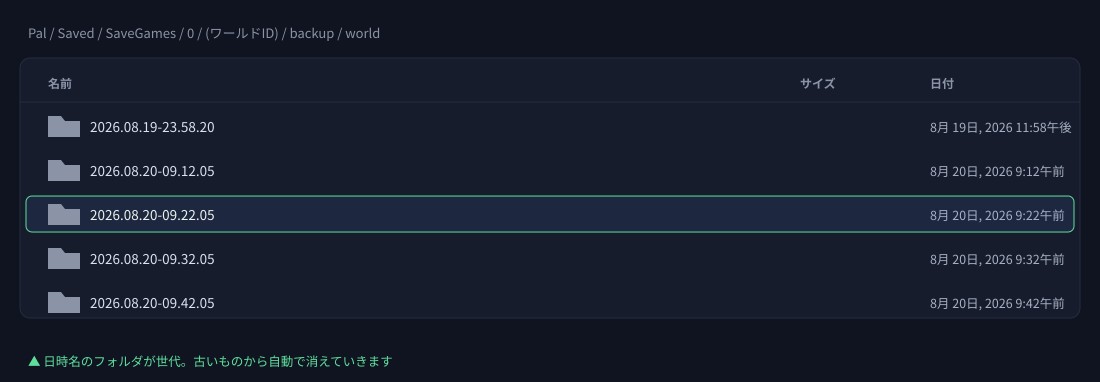
Pal → Saved → SaveGames → 0 → (a 32-character folder) → backup → world
Inside you will find folders named after a date and time, such as 2026.08.20-09.22.05. Each one is a generation. Alongside daily generations, recent ones are created every few tens of minutes.
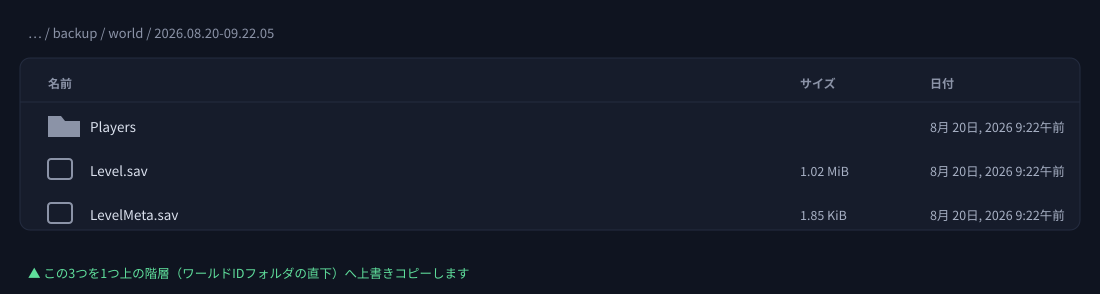
Open a generation folder and you will find Level.sav (the world itself), LevelMeta.sav, and Players (per-player data).
How to roll back
- Stop the server. Editing files while it runs can catch a write in progress and corrupt them.
- Take a panel backup of the current state, just in case. This operation cannot be undone, so keep somewhere to return to.
- Open the folder for the time you want, and copy
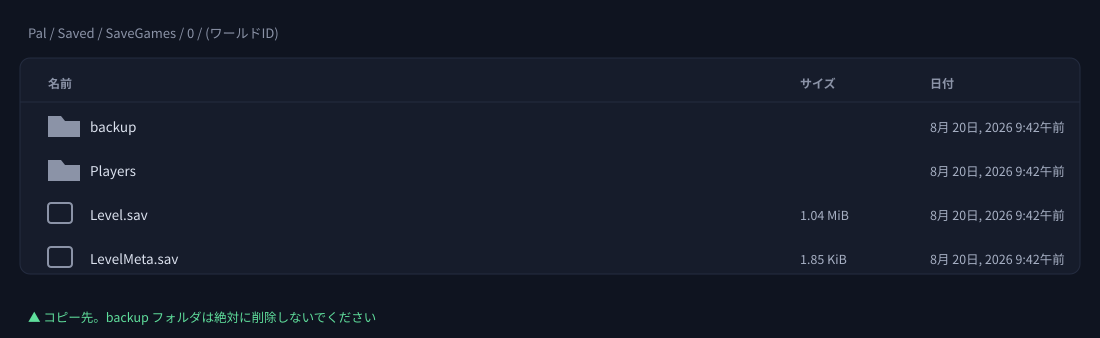
Level.sav/LevelMeta.sav/Playersup one level, directly intoSaveGames/0/(the 32-character folder), overwriting what is there. - Start the server.
Please read before you start
backup folder itself. The game moves data into this folder every time it saves, so deleting it stops saving from working at all.What can and cannot be recovered
| Situation | Can a generation backup help? |
|---|---|
| I deleted my save data by mistake | Often yes. If a generation from before the deletion is still there, you can go back to it. |
| My character was lost to hardcore death | Often yes. If a generation from before the death remains — but the whole world rolls back to that point. |
| The world is broken and the server will not start | Often yes. If a generation from when it was healthy is still there. |
| I want to go back several weeks | Unlikely. Older generations are removed automatically, so they are usually gone. |
| I want to roll back after reinstalling the server | No. Reinstalling removes the folder entirely. Use a panel backup instead. |


