Home
Game Servers
Locations
Support
Game server Wiki
FAQ
Contact
News
Company
Display Based on the Specified Commercial Transaction Act
About Us
Affliate
Client Portal
G
A
M
E
P
A
N
E
L
Home
Game Servers
Locations
Support
Game server Wiki
FAQ
Contact
News
Company
Display Based on the Specified Commercial Transaction Act
About Us
Affliate
Client Portal
View Categories
Home
Game-Server Wiki
Ark Svaival Evolved
ARK: Survival Evolved – How to Make Your Server Private for Friends Only
目次
ARK Survival Evolved - How to Make Your Server Friends-Only
1. Prerequisites
2. Revision History
3. Table of Contents
4. Changing Server Entry Password
5. Restarting the Server
V Rising Server
Satisfactory Server
7Days to Die Server
Project Zomboid
HumanitZ
SOUL MASK
7Days to Die
V Rising
Myth of Empires
Enshrouded
RUST
Valheim
ARMA3
PALWORLD
Conan Exiles
ARK Survival Evolved – How to Make Your Server Friends-Only
1. Prerequisites
Please log in to the Game Panel. For instructions on how to log in to the Game Panel, please see
here
2. Revision History
1.0:
Created: 2024/1
Update details: Initial version
Author: BESTNET-GSERVER
3. Table of Contents
1. Prerequisites
2. Revision History
3. Table of Contents
4. Changing the Server Entry Password
5. Restarting the Server
4. Changing the Server Entry Password
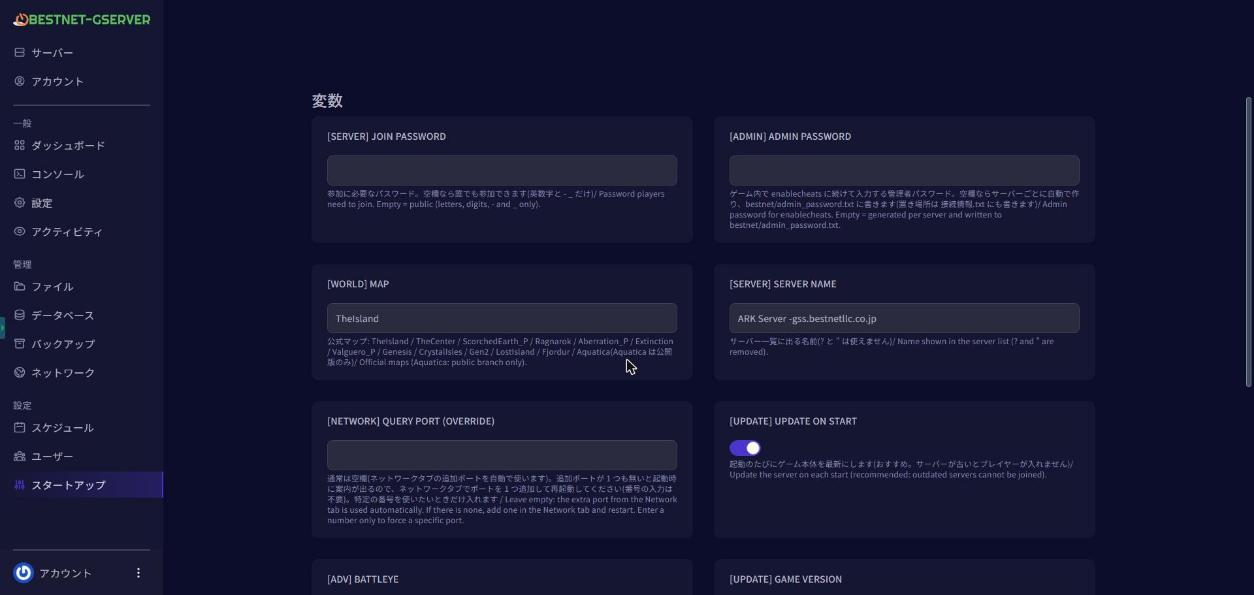
You can easily change the entry password from the Game Panel. You can set the admin password in the ‘PASSWORD’ field from the ‘Startup’ tab.
5. Restarting the Server
Navigate to the Console tab in the Game Panel and ‘Restart’ the server.

If you have any other questions, please submit a ticket.
ARK: Survival Evolved – How to Change Server Administrator Password
ARK: Survival Evolved – How to Change Server Name
Scroll to top