
Contents
ARK Survival Evolved – How to Change Server Name
1. Prerequisites
Please log in to the Game Panel. For instructions on how to log in to the Game Panel, please see here2. Revision History
- 1.0:
- Creation Date: 2024/1
- Update Content: Initial creation
- Creator: BESTNET-GSERVER
3. Table of Contents
4. Changing Server Name
You can easily change the server name displayed in the game browser from the Game Panel. Enter it in the [SERVER] Server Name field on the Startup tab. Up to 120 characters (? and ” cannot be used).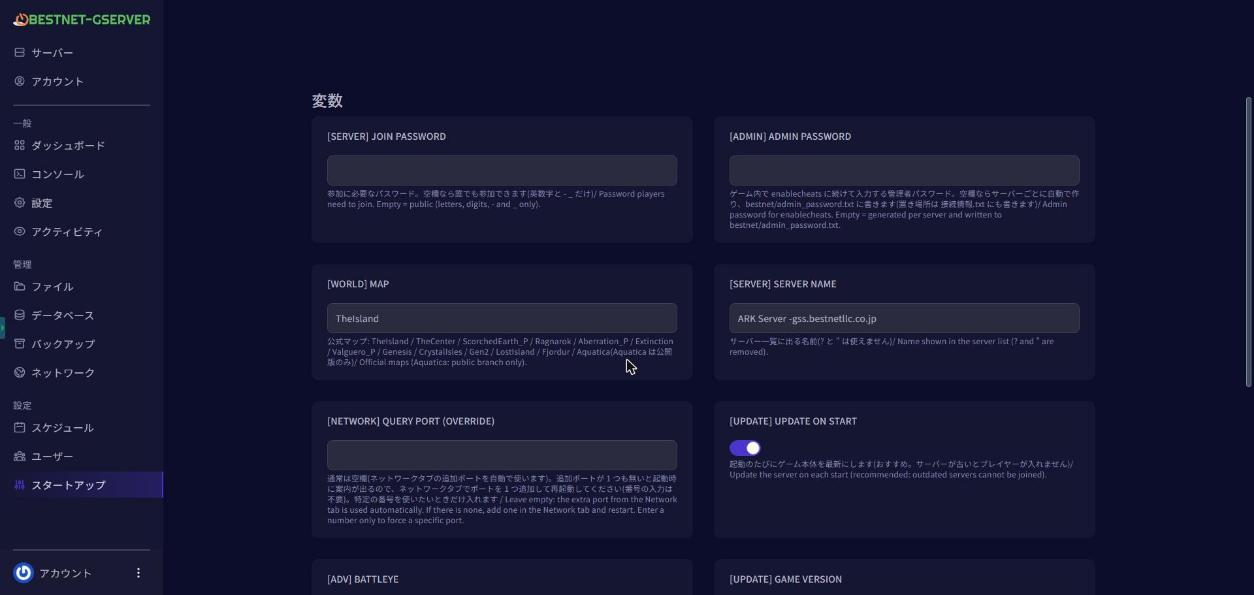
5. Server Restart
Navigate to the Console tab in the Game Panel and ‘Restart’ your server. If you have any other questions, please submit a ticket.


