Home
Game Servers
Locations
Support
Knowledge Base
FAQ
Contact
News
Company
Display Based on the Specified Commercial Transaction Act
About Us
Affiliates
Client Portal
G
A
M
E
P
A
N
E
L
Home
Game Servers
Locations
Support
Knowledge Base
FAQ
Contact
News
Company
Display Based on the Specified Commercial Transaction Act
About Us
Affiliates
Client Portal
View Categories
Home
Game-Server Wiki
HumanitZ
How to Change PvP Settings on a HumanitZ Server
How to Change PvP Settings on a HumanitZ Server
Contents
How to Change PvP Settings on HumanitZ Server 1.Game Panel Log in.
2. Stop the server.
3. Navigate to [Start up].
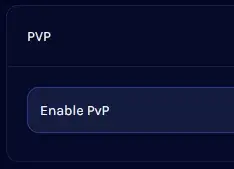
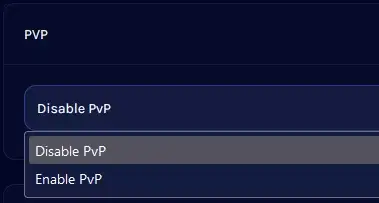
4. Find PvP.
5. Open the dropdown and select to turn PvP on or off.
6. Start the server.
V Rising Server
Satisfactory Server
7Days to Die Server
Enshrouded
HumanitZ
SOUL MASK
7Days to Die
V Rising
Myth of Empires
PALWORLD
RUST
Valheim
ARMA3
Project Zomboid
Conan Exiles
How to Change PvP Settings on HumanitZ Server
1.
Log in to
Game Panel
.
2.
Stop the server
3.
Go to
[Start up]
.
4.
Find
PvP
.
5.
Open the dropdown and select PvP on/off.
6.
Start the server.
How to Change Death Penalties on HumanitZ Servers
How to Spawn Items and Vehicles on a HumanitZ Server
Scroll to top
EN
日本語
English
✓
한국어
简体中文
繁體中文