
When joining Project Zomboid, you may see "WARNING: SERVER HAS PORT … CLOSED. PERFORMANCE MAY BE SEVERELY AFFECTED" on the loading screen. This message appears when the second port is not reachable. You can fix this in the game panel.
Revision History
- v1.0
- October 2026 — Initial version created
About This Warning
Project Zomboid servers use 2 ports. If the second port is not reachable, the following warning will appear on the loading screen when joining:
When this occurs, communication switches to a method that routes through Steam, which may cause latency.
First, Check
Console Display
In the Console tab, check the 2 本目のポート (Second port) field displayed at startup. If it shows ★見つかりません (Not found), a second port has not been assigned. If the console has scrolled past it, you can check the same line in 接続情報.txt (connection info) in the Files tab.
Number of Ports in Network Tab
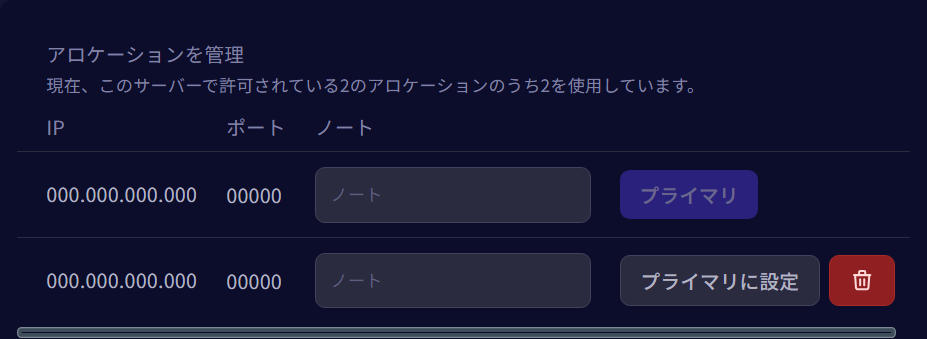
Open the Network tab to see the assigned ports listed.
- If there is only 1 line … Follow the steps starting from step 1 in "How to Fix" below
- If there are 2 lines but a warning appears … Follow the steps starting from step 3 in "How to Fix" below
How to Fix
- Open the Network tab and check if there are 2 port rows.
- If there is only 1 row, click "Create Allocation" (
Create Allocationin English panel) once.
If there are already 2 rows, this button will not be displayed. In that case, proceed to step 3. - Note the port number of the row that is not primary (only the port number, not the IP address).
- Enter the noted number in
[NETWORK] Second Port (UDP)on the Startup tab. - Restart the server from the Console tab and verify that the number from step 3 is displayed in the
2 本目のポート(Second port) field.
This will enable the second port to receive traffic.
Notes
You can add up to 2 ports
Up to 2 ports including the primary port. If you see a warning even though both ports exist, follow steps 3-5.
Do not delete ports
- Deleting the primary (main port) will change your connection address. The number you shared with your friends will no longer work
- Deleting the second port will cause the warning to appear again
If you delete or change the second port number, correct [NETWORK] Second Port (UDP) to the current number or clear it before restarting.
If the issue persists
Please contact us through a support ticket.


