
This article lists what to check when the game freezes, stutters, or players get disconnected. First, open your server in the game panel and look at the top of the screen for a "Server environment" notice. If no notice is shown, see "2. When nothing is shown but the server still feels slow".
Revision history
- v1.0
- October 2026 — First edition
1. Check the "Server environment" notice
When you open your server in the game panel, a "Server environment" notice may appear at the top of the screen. It is how we tell you about the state of the systems your server runs on.
- Nothing is shown under normal conditions.
- The notice updates automatically. You do not need to reload the page.
- The notice appears in the language you have selected in the game panel.
| Notice | What it means | What you need to do |
|---|---|---|
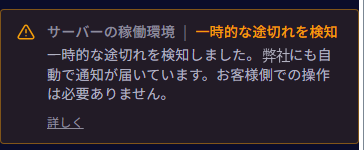
| ⚠ Temporary interruptions detected | "On the systems this server runs on, the game may freeze for a few seconds or players may be disconnected. This notice is shown automatically by our monitoring." | "You don't need to do anything." We have also been notified automatically. "This notice stays visible for a while after things settle down." |
| 🔧 Maintenance scheduled | "Maintenance is scheduled for the systems this server runs on: (date and time)." followed by one sentence about what happens during the work. | See "The sentence shown in a maintenance notice" below. |
| 🔧 Maintenance in progress | "Maintenance is in progress on the systems this server runs on (expected to finish around (time))." followed by one sentence about what happens during the work. | See "The sentence shown in a maintenance notice" below. |
| ⚪ Status unavailable | "We are not receiving status information for the systems this server runs on right now. This does not necessarily mean your server is affected." | "Please wait until the status returns." |




The sentence shown in a maintenance notice
A maintenance notice includes one sentence describing what happens during the work, depending on the type of work.
| Type of work | Sentence when scheduled | Sentence while in progress | What you need to do |
|---|---|---|---|
| Panel work | "During this time, the control panel will be unavailable and tasks scheduled in the panel (such as backups and restarts) will not run. Your game server will keep running." | "The control panel is currently unavailable and tasks scheduled in the panel are not running. Your game server keeps running." | Nothing in particular. |
| Work that stops the server once | "Your server will be stopped once during the work. If it is not running afterwards, please start it from this panel." | "Your server may be stopped during the work. If it is not running afterwards, please start it from this panel." | After the work, start the server from the game panel if it is not running. |
| Work that affects connections | "Connections may be briefly interrupted during this time." | "Connections may be briefly interrupted." | If you are disconnected, reconnect after the work. |
| Work that changes the connection address | "Your server will be stopped once during the work, and its connection address will change afterwards. Please check the new address on this panel once it completes." | "Your server is stopped during the work. Its connection address will change, so please check the new address on this panel once it completes." | After it completes, check the new connection address in the game panel, and tell the people you play with. |
| Other | "Please see our notice email for details." | "Please see our notice email for details." | See our notice email. |
How dates and times are shown
Dates and times are shown in Japan Standard Time (JST). If your device's time zone is different from Japan Standard Time, one extra line is added: "In your device's time zone: (date and time)."
"Details" and "Hide this notice"
- Selecting "Details" shows an additional explanation and a link to this article.
- The "Maintenance scheduled" notice can be closed with "Hide this notice". A notice you hide disappears only in the browser you are using (it still appears on other devices and browsers). When the maintenance starts, the "Maintenance in progress" notice appears.
- The "Temporary interruptions detected", "Maintenance in progress" and "Status unavailable" notices cannot be closed.
2. When nothing is shown but the server still feels slow
When nothing is shown under "Server environment", there is no incident or maintenance notice for the systems this server runs on. "In-game lag can also be caused by game settings, mods, the number of players, or the size of the world." Please check the following.
Is everyone affected, or only some players?
Check whether everyone playing is affected or only certain players. When only certain players experience lag or disconnections, the cause can be their own network (their line or Wi-Fi).
Number of players, mods, and the size of the world
When there are many players, when many mods are installed, or when the world has grown large, the server has more work to do. Check whether the time things got slower lines up with players being added, mods being installed, or the world expanding.
The CPU reading in the game panel
The server screen in the game panel shows CPU usage together with the limit of your plan, in the form "usage / limit" (for example, a 2-core plan shows "… / 200%"). If usage stays close to the limit while the server feels slow, you are using all of the CPU your plan provides. Changing to a higher plan increases the amount of CPU that can be used at once, which gives the server more headroom.
Is the work concentrated in one place?
In some games we have observed a tendency for much of the server's work to be concentrated in one part of the processing. When this happens, the game can feel slow even though CPU usage has not reached the limit. Reviewing the game settings (such as how many enemies or creatures spawn) and the number of things running at your base can ease it. For per-title adjustments, see "3. Per-title guides".
Scheduled backups and restarts
In "Schedules" in the game panel, check whether backups or restarts fall within the times of day when you play.
- Creating a backup puts load on the server. We recommend scheduling backups for times when fewer people are playing, and leaving an interval between them.
- If a restart is scheduled, everyone is disconnected each time it runs.
3. Per-title guides
- Palworld — the "Advanced tuning" section of "Palworld – Initial Setup"
- Project Zomboid — "Using mods on a Project Zomboid server (avoiding lag and disconnections)"
4. If it is still slow
If the server is still slow after checking the points above, please contact us. The following details help us look into it.
- The server name in the game panel (for example, Palworld-1234)
- When it became slow (an approximate time is fine) and how long it lasted
- How many players were connected at the time
- Which mods are installed
- What happened (freezing for a few seconds, rubber-banding, disconnections, and so on)
Frequently asked questions
"Temporary interruptions detected" appeared. Should I restart the server?
"You don't need to do anything." We have also been notified automatically.
"Temporary interruptions detected" will not go away.
"This notice stays visible for a while after things settle down."
Nothing is shown, but the server feels slow.
See "2. When nothing is shown but the server still feels slow". "In-game lag can also be caused by game settings, mods, the number of players, or the size of the world."
I hid the "Maintenance scheduled" notice.
A notice you hide disappears only in that browser. It still appears on other devices and browsers. When the maintenance starts, the "Maintenance in progress" notice appears.
"Status unavailable" is shown.
"We are not receiving status information for the systems this server runs on right now. This does not necessarily mean your server is affected. Please wait until the status returns."


