
Contents
- How to Grant Administrator Access on HumanitZ Server 1. Log in to the Game Panel.
- 2. Stop the server.
- 3. Navigate to the [Startup] tab.
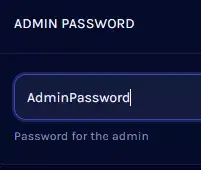
- 4. In the [Admin Password] table, enter your desired password.
- 5. Start the server.
- 6. Join the HumanitZ server.
- 7. Press Enter to open the chat.
- 8.Execute the following command to become an administrator: /AdminAccess [Password]
- V Rising Server
How to Grant Administrator Access on HumanitZ Server
1. Log in to the Game Panel.
2. Stop the server.

3. Navigate to the [Startup] tab.

4. In the [Admin Password] field, enter your desired password.
5. Start the server.
6. Join the HumanitZ server.
7. Press Enter to open the chat.
8.Execute the following command to become an administrator./AdminAccess [Password]

HumanitZ Admin Commands
| Command | Description |
/SuperAdmin | Become invisible and fly around the map. |
/Spawn item_[Item Name] | Spawn an item on the ground. |
/Spawn car_[Vehicle Name] | Spawn a vehicle. |
/Spawn Dog | Spawn a companion pet dog. |
/Exp [Number] | Give experience points to the player. |


