
Overview
In Myth of Empires, server descriptions function as an important information hub for prospective players, providing insights into “the server’s unique features, rules, and community guidelines.”
Administrators create detailed descriptions to highlight “gameplay mechanics, special events, and servers” and provide important information about custom modifications and regulations.
A well-crafted server description attracts an appropriate player base and establishes clear expectations for the community experience within this large-scale multiplayer war sandbox game.
How to Edit Server Description on Myth of Empires Servers
1. Log in to https://gsv.bestnetllc.co.jp/ Game Panel.
2. Stop your server.

3. Navigate to the [Startup] tab, which is the third from the top right.

4. In the [EXTRA FLAGS] field, enter the following: -description="ServerDescription"
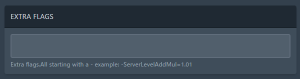
| Note | Multiple additional flags are separated by spaces. |
5. Start your server.


