
Overview
Using Myth of Empires MODs allows players to customize and expand their gameplay experience by introducing “new features, mechanics, and content.”
These modifications range from quality-of-life improvements to entirely new gameplay elements, providing players with diverse options to tailor their game experience to their preferences.
By incorporating MODs, server administrators can create unique and engaging gameplay environments, enrich the Myth of Empires experience, and foster a vibrant player community.
| Note | For clients connecting to the server, subscribing to Mods is faster than waiting for automatic downloads. |
How to Add Mods to Myth of Empires Server (Collection)
1. Log in to https://gsv.bestnetllc.co.jp/ Game Panel.
2. Stop your server.

3. Navigate to the [Startup] tab, which is the third from the top right.

4. In the [Steam Workshop Collection] field, toggle the button on.

5. Enter the desired Steam Workshop Collection ID.
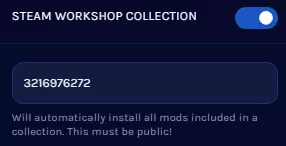
| Note | The Workshop Collection ID can be found in the collection’s URL. |
| Note | If the Workshop Collection is not set to public, the Workshop Downloader will not be able to find it. |
6. Start your server.
How to Add Mods to Myth of Empires Server (Manual)
1. Subscribe to the desired MOD in the Workshop.

2. From your Steam installation directory, locate the following directory:
\Steam\steamapps\workshop\content\1371580
3. Minimize the folder for use later in the tutorial.

| Note | The Workshop ID can be found in the mod’s Workshop URL. |
4. Log in to https://gsv.bestnetllc.co.jp/ Game Panel.
5. Stop your server.
6. Navigate to the [Files] tab, which is the second from the right.

7. Click the [SFTP Credentials] button.

8. Click [Launch SFTP].
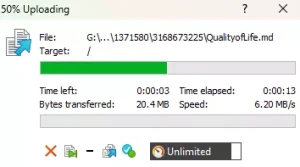
9. From SFTP, upload the desired MOD folder from step 3.
10. From the BisectHosting Game Panel, navigate to the [Startup] tab.
11. In the [EXTRA FLAGS] field, enter the following: -SteamModList="/home/container/ModFolderName"
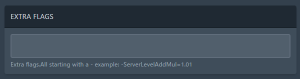
| Note | Separate multiple mod directories with the + symbol. Example: "/home/container/ModFolderName1+/home/container/ModFolderName2" |
12. Start your server.


