
Contents
ARK Survival Evolved – How to Change Maps
1. Prerequisites
Please log in to the game panel. For instructions on how to log in to the game panel, please see here2. Revision History
- 1.0:
- Creation Date: 2024/1
- Update Details: Initial version created
- Author: BESTNET-GSERVER
3. Table of Contents
4. Changing the Map
You can easily change the map from the game panel. Choose it in [WORLD] Map on the Startup tab. The default is TheIsland. The map changes once you choose one and restart the server. TheIsland, TheCenter, ScorchedEarth_P, Ragnarok, Aberration_P, Extinction, Valguero_P, Genesis, CrystalIsles, Gen2, LostIsland, Fjordur, Aquatica Aquatica can only be selected while [UPDATE] Game Version is set to public. ※Depending on the map, startup may fail due to insufficient memory. In that case, please consider upgrading your plan.※ In the example image, it has been changed to Genesis 2.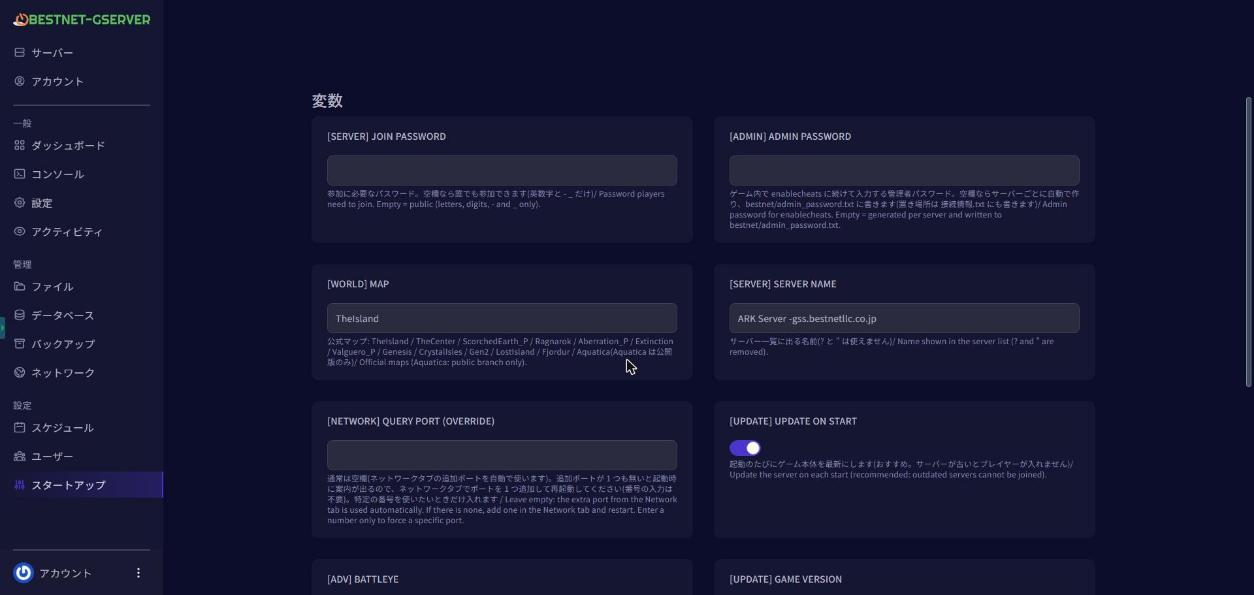
5. Restarting the Server
Navigate to the Console tab in the game panel and ‘Restart’ the server. If you have any other questions, please submit a ticket.


