Contents
How to Add ARK: Survival Evolved MOD
1. Prerequisites
Please log in to the Game Panel. For instructions on how to log in to the Game Panel, please see here2. Revision History
- 1.0:
- Created: 2024/1
- Update: Initial version created
- Author: BESTNET-GSERVER
3. Table of Contents
- 1. Prerequisites
- 2. Revision History
- 3. Table of Contents
- 4. Creating a Backup
- 5. Confirming MOD ID
- 6. Entering the mod IDs on the Startup tab
- 7. Restarting the server so they load
4. Creating a Backup
Please create a backup before performing any work. Backups can be easily created from the Game Panel and restored with a single click. Please refer to the following: Backup creation procedure is here5. Confirming MOD ID
The ID of the MOD to install can be found on the Steam Workshop. You can access the Steam Workshop from here: https://steamcommunity.com/app/346110/workshop/ The number at the end of the MOD page URL in Steam Workshop is the MOD ID.6. Entering the mod IDs on the Startup tab
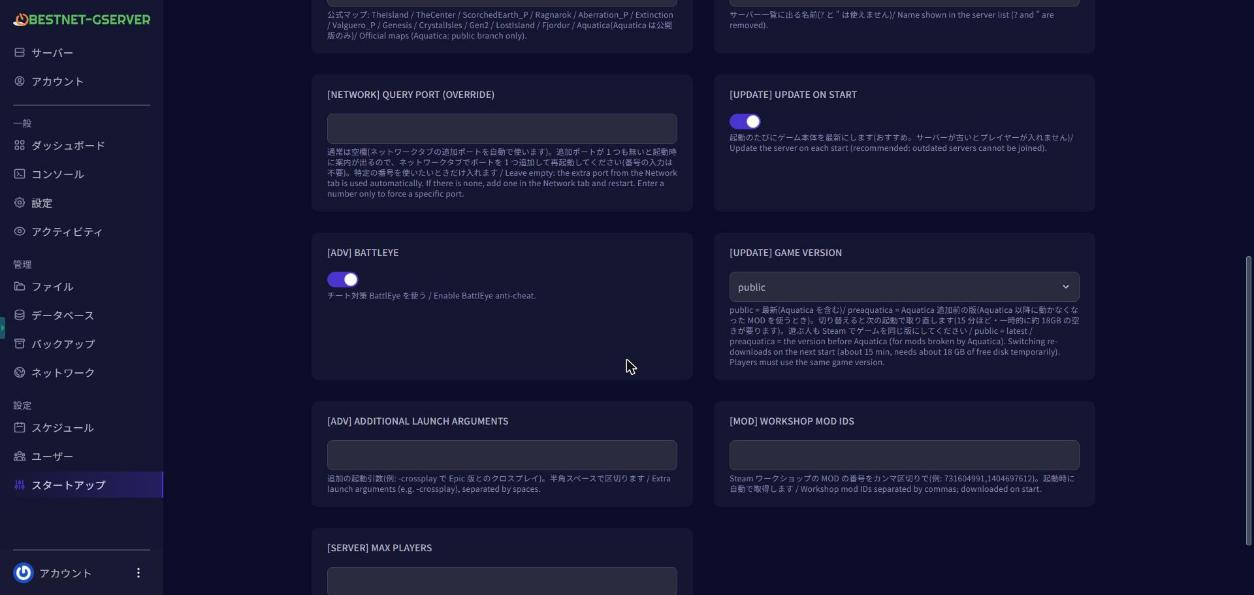
Mods are downloaded automatically when the server starts. You do not need to upload any files yourself. Open Startup in the game panel and enter the mod IDs in [MOD] Workshop Mod IDs. To add more than one, separate them with commas, for example 731604991,1404697612.