
Contents
MAP
You can switch the map on your Soulmask server yourself from the game panel. Choose between Cloud Mist Forest, the standard map, and Shifting Sands, the DLC map. Each map keeps its own separate world.
The maps you can choose
| Value | Map |
|---|---|
Level01_Main | Cloud Mist Forest (standard map, default) |
DLC_Level01_Main | Shifting Sands (DLC map) |
To join a Shifting Sands server, every player must own the “Shifting Sands” DLC on Steam. Nothing extra needs to be purchased on the server side. The DLC is currently a paid item.
Please read this before you change it
Switching maps starts a brand new world on that map, from scratch.
Your existing characters and bases do not carry over. You cannot continue your current progress on a different landmass.
Your existing characters and bases do not carry over. You cannot continue your current progress on a different landmass.
That said, your previous world is not deleted. Each map keeps its own world, so switching never deletes or overwrites the other one. Switch back and your previous world picks up exactly where you left it.
Save data is also per map. If you upload your own save data, it must be save data created on that map. See How to upload save data to your Soulmask server for details.
How to change the map
- Log in to the game panel and select your Soulmask server.
- On the Console screen press Stop, and wait until the status reads Offline.
- Open Startup from the left-hand menu.
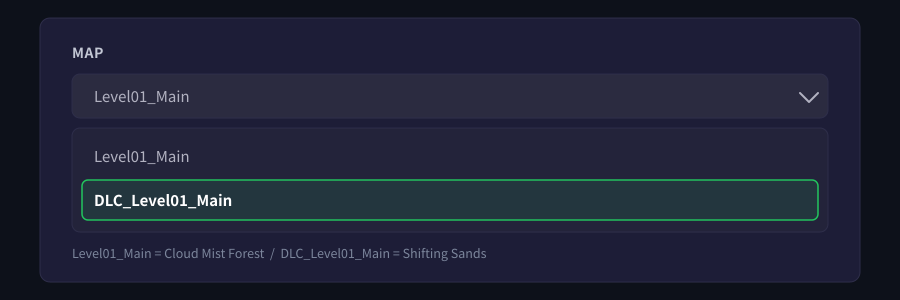
- Scroll down and pick the map you want under MAP.
- Your choice is saved as soon as you pick it — there is no save button.
- Go back to the Console screen and press Start.
Always stop the server before changing this. Switching while it is running risks mixing in data that was still being written.
The first start after a switch creates that map's world, so it can take a little longer than usual.
Going back to your previous map
Follow the same steps and pick Level01_Main again. Your earlier world is still there, so you can carry on from where you left off.
What is not possible
Running both maps at once on a single server, or travelling between the maps, is not something our service supports at present.
If something does not go to plan
| Symptom | What to check |
|---|---|
| I changed it, but the old map still loads | Did you stop the server first? If you changed it while running, stop the server and start it again. |
| After switching, the world was empty | That is a new world on that map. Switch back and your previous world resumes as it was. |
| My friends cannot join | For Shifting Sands, every player needs to own the DLC. |
| The save data I uploaded is not loaded | Save data is per map. Check that it is in the folder for the map you are running. |
If that does not resolve it, send us the message exactly as it appears and we will look into it.


