
Contents
- How to Edit Loot Respawn on HumanitZ Server 1. Log in to the Game Panel.
- 2. Stop the server.
- 3. Navigate to the Startup tab.
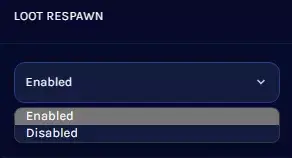
- 4. Select your desired value from the [LOOT RESPAWN] field.
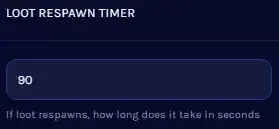
- 5. Edit your desired time in the [LOOT RESPAWN TIMER] field.
- 6. Select your desired loot rarity from the [LOOT RARITY] field.
- 7. Start the server.
- V Rising Server
How to Edit Loot Respawn on HumanitZ Server
1. Log in to the Game Panel.
2. Stop your server.

3. Navigate to the [Start up] tab.

4. Select your desired value from the [LOOT RESPAWN] field.
5. Edit your desired time in the [LOOT RESPAWN TIMER] field.
6. Select your desired loot rarity from the [LOOT RARITY] field.
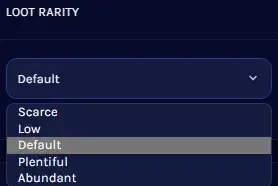
| Note | Loot rarity indicates how much loot is present. |



