
Contents
How to Change Your Valheim Server Password
1. Prerequisites
Please log in to the game panel.
For instructions on how to log in to the game panel, please see here
2. Revision History
- 1.0:
- Created: 2024/1
- Update: Initial version created
- Created by: BESTNET-GSERVER
3. Table of Contents
- 1. Prerequisites
- 2. Revision History
- 3. Table of Contents
- 4. Creating a Backup
- 5. Opening the ‘adminlist.ext’ File
- 6. Entering the SteamID64 of the Player You Want to Make an Administrator
- 7. Clicking ‘SAVE CONTENT’
- 8. Adding -console to Launch Options in the Valheim Client
4. Creating a Backup
Please create a backup before performing this task.
Backups can be easily created from the game panel and can be restored with a single click.
Please refer to the following:
Backup creation steps are available here
5. Changing the Server Password
Log in to the game panel and click ‘Startup’.
Then enter your desired password in ‘SERVER PASSWORD’.
The image below is a reference example.

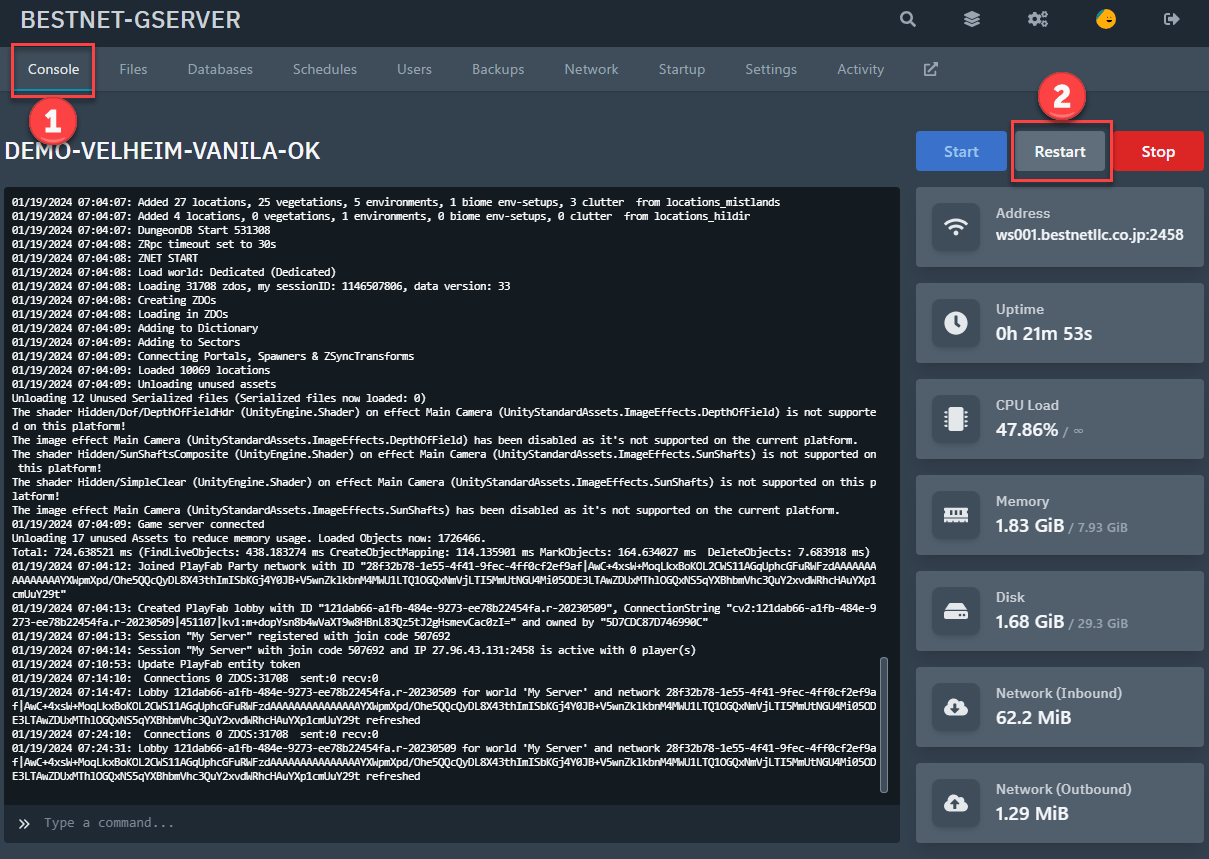
6. Restarting the Server
The server must be restarted for the settings to take effect.
Navigate to the ‘Console’ tab and click the ‘Restart’ button.
If you have any further questions, please submit a ticket.


