
Home
Game Servers
Locations
Support
Game server Wiki
FAQ
Contact
News
Company
Display Based on the Specified Commercial Transaction Act
About Us
Affliate
Client Portal
G
A
M
E
P
A
N
E
L
Home
Game Servers
Locations
Support
Game server Wiki
FAQ
Contact
News
Company
Display Based on the Specified Commercial Transaction Act
About Us
Affliate
Client Portal
View Categories
Home
Game-Server Wiki
HumanitZ
How to Change Death Penalties on HumanitZ Servers
目次
How to Change Death Penalties on HumanitZ Server 1. Log in to the Game Panel.
2. Stop the server.

3. Go to the [Start up] tab.
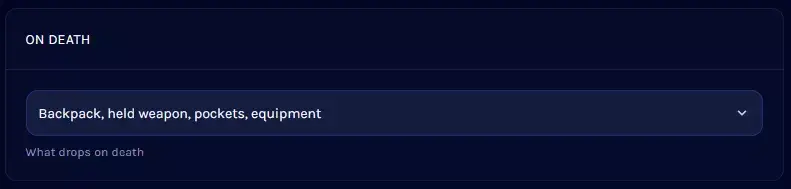
4. Find the [ON DEATH] section.
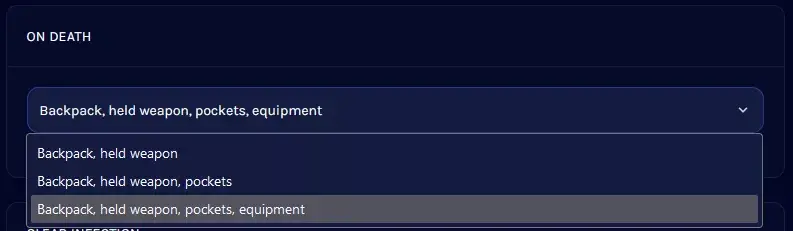
5. Open the dropdown menu and select the desired penalty.
6. Start the server.
V Rising Server
Satisfactory Server
7 Days to Die Server
Enshrouded
HumanitZ
SOUL MASK
7 Days to Die
V Rising
Myth of Empires
PALWORLD
RUST
Valheim
ARMA3
Project Zomboid
Conan Exiles
How to Change Death Penalties on HumanitZ Servers
1.
Log in to the Game Panel
.
2.
Stop the server.
3.
Go to the
[Startup]
tab.
4.
Find the
[ON DEATH]
section.
5.
Open the dropdown menu and select the desired penalty.
Note
This setting cannot completely disable item dropping. Players will always drop their
backpack
and
equipped weapons
.
6.
Start the server.
How to Change Day/Night Length on HumanitZ Servers
How to Change PvP Settings on a HumanitZ Server
Scroll to top
EN
日本語
English
✓
한국어
简体中文
