- Enshrouded Server SettingsComplete Guide
- About this page
- ⚠️ Please read before you change anything
- Basic server information
- Chat features
- Permission group: Admin
- Permission group: Friend
- Permission group: Guest
- Permission group: Visitor
- Finding and changing the join passwords
- Difficulty presets
- Player settings
- Survival settings
- Resources and gathering
- Experience points
- Enemies
- World settings
- Steam settings (advanced)
- System settings (advanced)
- Changing settings that have no field on the Startup tab (advanced)
- 🔧 Troubleshooting
- Related documents
Enshrouded Server Settings
Complete Guide
All 77 server settings on one page. For each item: default value, constraints, effect and recommended value (2 of them are not shown on the Startup tab).
About this page
On a BESTNET-GSERVER Enshrouded server you can change the server settings from the Variables feature in the game panel, through a graphical interface. This page covers all 77 server settings, with the effect, the recommended value and the points to watch for each one (2 of them are not shown on the Startup tab and cannot be changed).
The items are grouped by purpose into 15 categories — difficulty presets, permission groups, enemy behaviour, experience multipliers and so on. Use the table of contents to jump straight to the one you want.
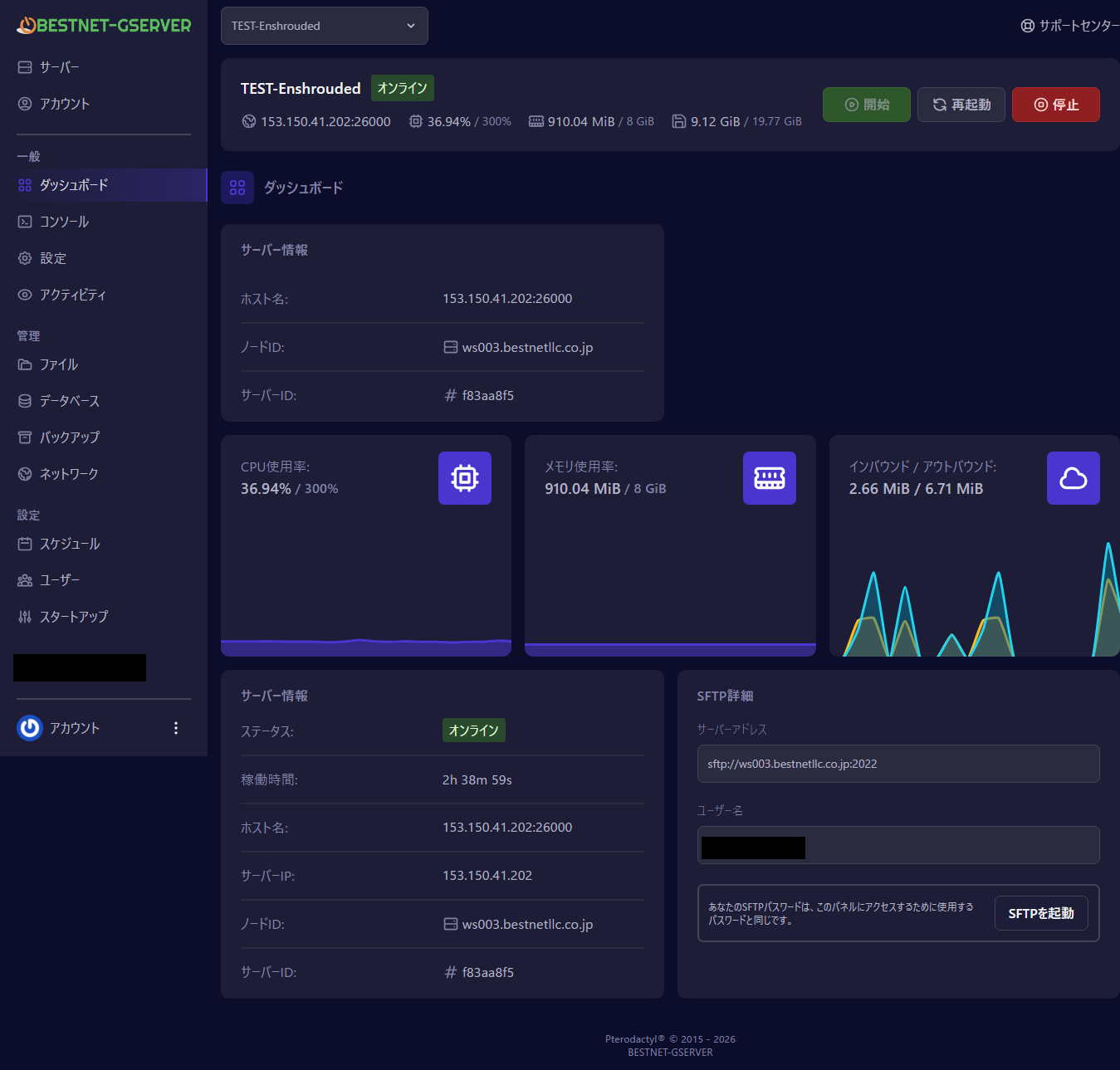
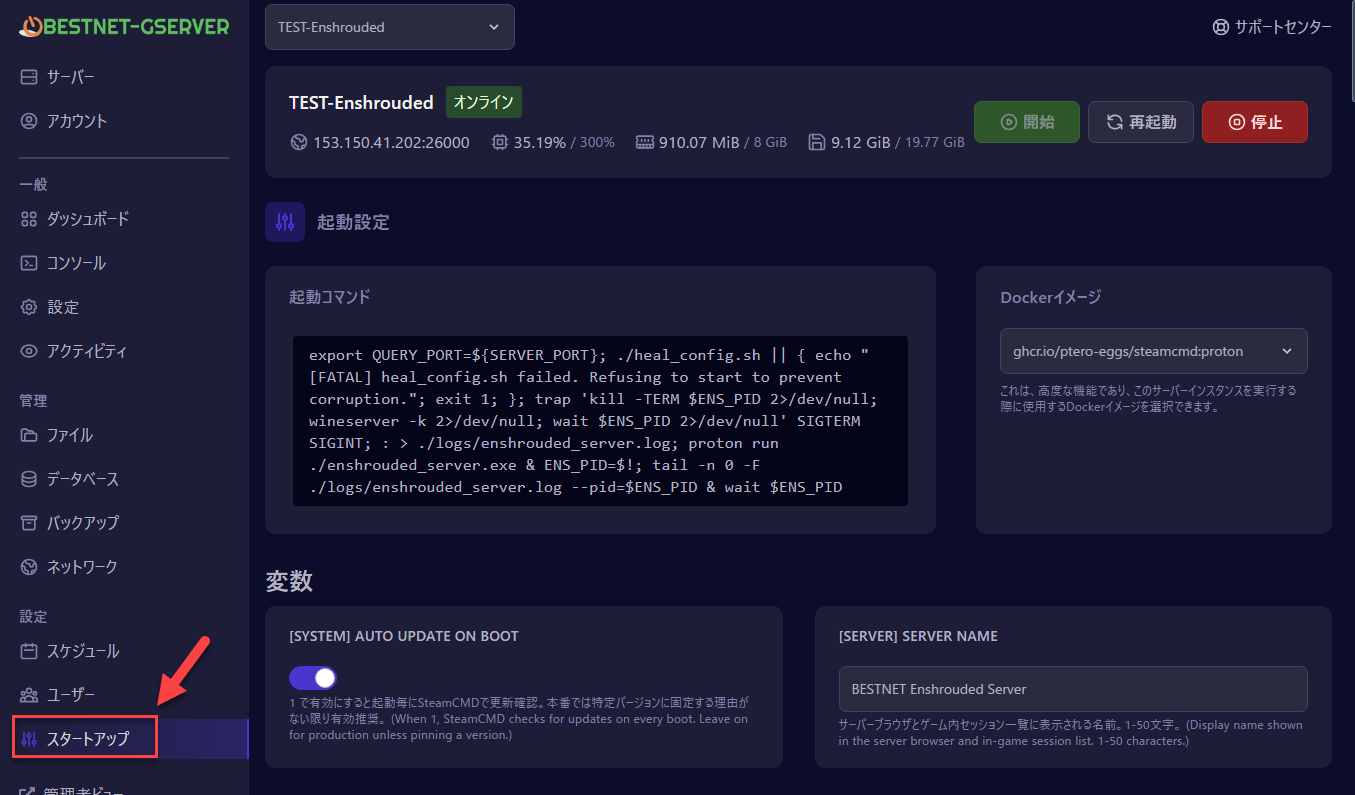
How to edit a variable
- Sign in to the game panel (
https://gsv.bestnetllc.co.jp/) - Click your Enshrouded server to open it
- Choose the Startup tab (or Variables) in the left sidebar
- Edit the value you want to change, then click Save Settings at the bottom of the page
- Restart the server to apply the new settings
⚠️ Please read before you change anything
- Three rules for passwords that cannot be broken:
- The passwords for the four permission groups (Admin / Friend / Guest / Visitor) must all be different from one another (if any two match, the server refuses to start)
- A password cannot be digits only (for example
123456is rejected) - Spaces, quotation marks (
",'), backslashes and non-ASCII characters cannot be used
- Difficulty multipliers: these only apply when the preset is
Custom. If you have chosenDefault/Relaxed/Hard/Survival, changing an individual multiplier has no effect. - Leaving a variable blank: for the multipliers we recommend leaving them blank (not set). A blank field means Enshrouded’s own default is used, so your server follows along automatically when a game update changes it.
- Changes apply on restart: Save Settings alone does not apply them. Always restart the server.
Basic server information
Server name, maximum players and other basic details that identify your server.
| Variable | Default | Constraints | Description |
|---|---|---|---|
Server Name
SRV_NAME | Enshrouded Server | Required / String / Min 1 / Max 50 | Display name shown in the server browser and in-game session list. 1-50 characters. |
Max Players
MAX_PLAYERS | 16 | Required / Number / Min 1 / Max 16 | Maximum simultaneous players, 1-16. Enshrouded hard-caps at 16. |
Chat features
Turning voice chat and text chat on or off, and how they behave.
| Variable | Default | Constraints | Description |
|---|---|---|---|
Enable Voice Chat
ENABLE_VOICE_CHAT | 0 | Required / Boolean (0/1) | 1 enables in-game voice chat, 0 disables. Added in Update 5 (Pact of the Flame). |
Voice Chat Mode
VOICE_CHAT_MODE | Proximity | Required / String / Options: Proximity / Global | 'Proximity' = hear nearby players only. 'Global' = hear all players regardless of distance. |
Enable Text Chat
ENABLE_TEXT_CHAT | 0 | Required / Boolean (0/1) | 1 enables in-game text chat, 0 disables. |
Permission group: Admin
For the server owner. Can kick and ban, and has full building and editing rights.

| Variable | Default | Constraints | Description |
|---|---|---|---|
Password
SRV_PW_ADMIN | Initial value set at order (starts with ChangeMe…) | Optional / String / Min 8 / Max 64 | Admin role password. Empty or the ChangeMe… default = a password made for this server is used, shown in the console under “Join passwords” on every start and saved in join_passwords.txt. Servers that do not show that console block (created before 2026-10-19) do not do this: set your own value here. To set your own: 8-64 chars, letters/digits/!@#%^*()_-+=[]{}:,.? only. All four group passwords must differ or the server refuses to start. |
Reserved Slots
RESERVED_ADMIN | 0 | Required / Number / Min 0 / Max 16 | Slots held open exclusively for Admin-tier players. 0-16. |
Can Kick/Ban
CAN_KICKBAN_ADMIN | 1 | Required / Boolean (0/1) | 1 = can kick and ban other players via the in-game Social tab. |
Can Access Inventories
CAN_INV_ADMIN | 1 | Required / Boolean (0/1) | 1 = can open chests and storage owned by other players. |
Can Edit Base
CAN_EDIT_BASE_ADMIN | 1 | Required / Boolean (0/1) | 1 = can build and demolish blocks within base claims. |
Can Extend Base
CAN_EXT_BASE_ADMIN | 1 | Required / Boolean (0/1) | 1 = can place new flame altars to expand claim radius. |
Can Edit World
CAN_EDIT_WORLD_ADMIN | 1 | Required / Boolean (0/1) | 1 = can mine, fell trees, and modify terrain outside base claims. |
Permission group: Friend
For friends you trust. Can build and edit, but cannot kick or ban.
| Variable | Default | Constraints | Description |
|---|---|---|---|
Password
SRV_PW_FRIEND | Initial value set at order (starts with ChangeMe…) | Optional / String / Min 8 / Max 64 | Friend role password. Empty or the ChangeMe… default = made for this server automatically (console “Join passwords” / join_passwords.txt; if that console block does not appear, set your own). Must differ from Admin/Guest/Visitor. |
Reserved Slots
RESERVED_FRIEND | 1 | Required / Number / Min 0 / Max 16 | Slots held for Friend-tier players. 0-16. |
Can Kick/Ban
CAN_KICKBAN_FRIEND | 0 | Required / Boolean (0/1) | 1 = friends can kick/ban. Usually 0. |
Can Access Inventories
CAN_INV_FRIEND | 1 | Required / Boolean (0/1) | 1 = friends can open each other's storage. |
Can Edit Base
CAN_EDIT_BASE_FRIEND | 1 | Required / Boolean (0/1) | 1 = friends can build/demolish in base claims. |
Can Extend Base
CAN_EXT_BASE_FRIEND | 1 | Required / Boolean (0/1) | 1 = friends can place new flame altars. |
Can Edit World
CAN_EDIT_WORLD_FRIEND | 1 | Required / Boolean (0/1) | 1 = friends can mine/cut outside claims. |
Permission group: Guest
For short-term visitors. Can look around, but gets no editing rights.
| Variable | Default | Constraints | Description |
|---|---|---|---|
Password
SRV_PW_GUEST | Initial value set at order (starts with ChangeMe…) | Optional / String / Min 8 / Max 64 | Guest role password. Empty or the ChangeMe… default = made for this server automatically (console “Join passwords” / join_passwords.txt; if that console block does not appear, set your own). Must differ from Admin/Friend/Visitor. |
Reserved Slots
RESERVED_GUEST | 3 | Required / Number / Min 0 / Max 16 | Slots held for Guest-tier players. Default 3. |
Can Kick/Ban
CAN_KICKBAN_GUEST | 0 | Required / Boolean (0/1) | 1 = guests can moderate. Usually 0. |
Can Access Inventories
CAN_INV_GUEST | 0 | Required / Boolean (0/1) | 1 = guests can open chests of others. Usually 0. |
Can Edit Base
CAN_EDIT_BASE_GUEST | 0 | Required / Boolean (0/1) | 1 = guests can build in claims. |
Can Extend Base
CAN_EXT_BASE_GUEST | 0 | Required / Boolean (0/1) | 1 = guests can place altars. |
Can Edit World
CAN_EDIT_WORLD_GUEST | 0 | Required / Boolean (0/1) | 1 = guests can mine/cut outside claims. |
Permission group: Visitor
View-only. The most restricted group, for sightseers.
| Variable | Default | Constraints | Description |
|---|---|---|---|
Password
SRV_PW_VISITOR | Initial value set at order (starts with ChangeMe…) | Optional / String / Min 8 / Max 64 | Visitor role password (most restrictive tier). Empty or the ChangeMe… default = made for this server automatically (console “Join passwords” / join_passwords.txt; if that console block does not appear, set your own). Must differ from Admin/Friend/Guest. |
Reserved Slots
RESERVED_VISITOR | 0 | Required / Number / Min 0 / Max 16 | Slots held for Visitor-tier players. Usually 0. |
Can Kick/Ban
CAN_KICKBAN_VISITOR | 0 | Required / Boolean (0/1) | 1 = visitors can moderate. Almost always 0. |
Can Access Inventories
CAN_INV_VISITOR | 0 | Required / Boolean (0/1) | 1 = visitors can open chests. Almost always 0. |
Can Edit Base
CAN_EDIT_BASE_VISITOR | 0 | Required / Boolean (0/1) | 1 = visitors can build in claims. Almost always 0. |
Can Extend Base
CAN_EXT_BASE_VISITOR | 0 | Required / Boolean (0/1) | 1 = visitors can place altars. Almost always 0. |
Can Edit World
CAN_EDIT_WORLD_VISITOR | 0 | Required / Boolean (0/1) | 1 = visitors can mine/cut. Almost always 0. |
Finding and changing the join passwords
Where the password you give your friends is shown, and what to do if you want to set it yourself.
ChangeMe, but that value will not let you into the server. To join, use the password described under “How to find them” below.When a password is made for you
When the four password fields on the Startup tab (Admin / Friend / Guest / Visitor) are empty, or still hold the default value (a value starting with ChangeMe is shown), a separate password is prepared for each server. It is 16 letters and digits, and leaves out the easily confused 0, O, 1, l and I.
How to find them
The same value is shown in these two places.
- The console — every time the server starts, a “Join passwords” heading and the four passwords are shown.
- The file
join_passwords.txt— open the Files tab of the game panel; it is at the top level.
Setting your own
Enter it in the field on the Startup tab and restart. The value you enter takes precedence.
- 8-64 characters
- Letters, digits and
!@#%^*()_-+=[]{}:,.?only - All four must be different (if any two are the same, the server will not start)
join_passwords.txt (the console records “set in the panel”, and join_passwords.txt records that the value from the panel is in use). Please keep your own note of it.Getting a new one
Do either of the following and restart, and you will get a new value.
- Delete the line for the role you want to renew from
join_passwords.txt - For a role where you entered your own value, clear that field on the Startup tab
Servers ordered before 2026-10-19
No password is made for you (the “Join passwords” block is not shown in the console). Set the four passwords on the Startup tab of the game panel. How to set them is the same as “Setting your own” above.
Difficulty presets
Four presets (Default / Relaxed / Hard / Survival), or Custom to tune every item yourself.
![[DIFFICULTY] Game Settings Preset: choosing a preset](https://gss.bestnetllc.co.jp/wp-content/uploads/2026/04/IMG_004_difficulty_preset.png)
| Variable | Default | Constraints | Description |
|---|---|---|---|
Game Settings Preset
GAME_PRESET | Default | Required / String / Options: Default / Relaxed / Hard / Survival / Custom | Default = the developer's baseline. Relaxed/Hard/Survival = presets. Custom = use the multipliers below. NOTE: setting any [GAME: *] value on the Startup tab (a multiplier, an on/off switch or a choice) switches the preset to Custom on boot, including values of 0 and 1. On servers ordered before 2026-10-19 that does not happen for 0, 1 or the on/off items, so select Custom here. |
Player settings
Multipliers for player health, mana, stamina and other physical attributes. Only applied when the preset is Custom.
| Variable | Default | Constraints | Description |
|---|---|---|---|
Health Factor
PLAYER_HEALTH_FACTOR | (not set) | Optional / Number / Min 0.25 / Max 4 | Player health multiplier. Range 0.25-4.0. 1.0 = vanilla. Applied only when preset is Custom. |
Mana Factor
PLAYER_MANA_FACTOR | (not set) | Optional / Number / Min 0.25 / Max 4 | Player mana multiplier. 0.25-4.0. |
Stamina Factor
PLAYER_STAMINA_FACTOR | (not set) | Optional / Number / Min 0.25 / Max 4 | Player stamina multiplier. 0.25-4.0. |
Body Heat Factor
PLAYER_BODY_HEAT_FACTOR | (not set) | Optional / Number / Min 0.5 / Max 2 | Cold resistance / body heat retention. 0.5-2.0. |
Diving Time Factor
PLAYER_DIVING_TIME_FACTOR | (not set) | Optional / Number / Min 0.25 / Max 2 | Underwater breath duration. 0.25-2.0. |
Survival settings
Hunger, durability, tombstone mode, weather and the other survival mechanics.
| Variable | Default | Constraints | Description |
|---|---|---|---|
Enable Durability
ENABLE_DURABILITY | (not set) | Optional / Boolean (0/1) | 1 = weapons/tools degrade with use. 0 = no degradation. |
Enable Starving Debuff
ENABLE_STARVING_DEBUFF | (not set) | Optional / Boolean (0/1) | 1 = hunger reduces stats below threshold. 0 = hunger purely cosmetic. |
Food Buff Duration Factor
FOOD_BUFF_DURATION_FACTOR | (not set) | Optional / Number / Min 0.5 / Max 2 | Multiplier on cooked-meal buff duration. 0.5-2.0. |
Hunger to Starving (seconds)
FROM_HUNGER_TO_STARVING_SEC | (not set) | Optional / Number / Min 300 / Max 1200 | Time from full hunger to starving onset in SECONDS (300-1200 = 5-20 min). Internally converted to nanoseconds. |
Shroud Time Factor
SHROUD_TIME_FACTOR | (not set) | Optional / Number / Min 0.5 / Max 2 | Multiplier on time you can survive inside the Shroud. 0.5-2.0. |
Tombstone Mode
TOMBSTONE_MODE | (not set) | Optional / String / Options: Everything / AddBackpackMaterials / NoTombstone | On death: Everything = drop full inventory. AddBackpackMaterials = also recover backpack mats. NoTombstone = lose nothing. |
Enable Glider Turbulences
ENABLE_GLIDER_TURBULENCES | (not set) | Optional / Boolean (0/1) | 1 = wind affects glider flight (default). 0 = stable gliding always. |
Weather Frequency
WEATHER_FREQUENCY | (not set) | Optional / String / Options: Disabled / Rare / Normal / Often | How often weather events occur: Disabled / Rare / Normal / Often. |
Fishing Difficulty
FISHING_DIFFICULTY | (not set) | Optional / String / Options: VeryEasy / Easy / Normal / Hard / VeryHard | Difficulty of the fishing minigame: VeryEasy / Easy / Normal / Hard / VeryHard. |
Curse Modifier
CURSE_MODIFIER | (not set) | Optional / String / Options: Easy / Normal / Hard | Strength of curse debuffs: Easy / Normal / Hard. |
Resources and gathering
Multipliers for mining damage, plant growth, drop quantities and production speed.
| Variable | Default | Constraints | Description |
|---|---|---|---|
Mining Damage Factor
MINING_DAMAGE_FACTOR | (not set) | Optional / Number / Min 0.5 / Max 2 | Mining tool damage per swing. 0.5-2.0. |
Plant Growth Speed Factor
PLANT_GROWTH_SPEED_FACTOR | (not set) | Optional / Number / Min 0.25 / Max 2 | Crop growth speed multiplier. 0.25-2.0. |
Resource Drop Stack Factor
RESOURCE_DROP_STACK_AMOUNT_FACTOR | (not set) | Optional / Number / Min 0.25 / Max 2 | Stack size dropped per resource node. 0.25-2.0. |
Factory Production Speed Factor
FACTORY_PRODUCTION_SPEED_FACTOR | (not set) | Optional / Number / Min 0.25 / Max 2 | Crafting station throughput. 0.25-2.0. |
Perk Recycling Refund
PERK_UPGRADE_RECYCLING_FACTOR | (not set) | Optional / Number / Min 0 / Max 1 | Fraction of perk cost refunded on recycle. 0.0-1.0. |
Perk Cost Factor
PERK_COST_FACTOR | (not set) | Optional / Number / Min 0.25 / Max 2 | Multiplier on perk point cost. 0.25-2.0. |
Experience points
Experience multipliers for combat, mining and exploration quests.
| Variable | Default | Constraints | Description |
|---|---|---|---|
Combat XP Factor
XP_COMBAT_FACTOR | (not set) | Optional / Number / Min 0.25 / Max 2 | XP gain from combat. 0.25-2.0. |
Mining XP Factor
XP_MINING_FACTOR | (not set) | Optional / Number / Min 0 / Max 2 | XP gain from mining. 0-2.0. Setting 0 disables mining XP (the preset switches to Custom on boot; on servers ordered before 2026-10-19, set the preset to Custom yourself). |
Exploration & Quests XP Factor
XP_EXPLORATION_QUESTS_FACTOR | (not set) | Optional / Number / Min 0.25 / Max 2 | XP gain from quests and discovery. 0.25-2.0. |
Enemies
Health, damage and detection range for regular enemies and bosses, plus how many appear and how dangerous they are.
| Variable | Default | Constraints | Description |
|---|---|---|---|
Random Spawner Density
RANDOM_SPAWNER_AMOUNT | (not set) | Optional / String / Options: Few / Normal / Many / Extreme | How many random encounters spawn in the wild: Few / Normal / Many / Extreme. |
Aggro Pool Size
AGGRO_POOL_AMOUNT | (not set) | Optional / String / Options: Few / Normal / Many / Extreme | Maximum number of enemies that can chase a single player at once: Few / Normal / Many / Extreme. |
Damage Factor (non-boss)
ENEMY_DAMAGE_FACTOR | (not set) | Optional / Number / Min 0.25 / Max 5 | Non-boss enemy damage multiplier. 0.25-5.0. |
Health Factor (non-boss)
ENEMY_HEALTH_FACTOR | (not set) | Optional / Number / Min 0.25 / Max 4 | Non-boss enemy HP multiplier. 0.25-4.0. |
Stamina Factor
ENEMY_STAMINA_FACTOR | (not set) | Optional / Number / Min 0.5 / Max 2 | Enemy stamina multiplier. 0.5-2.0. |
Perception Range Factor
ENEMY_PERCEPTION_RANGE_FACTOR | (not set) | Optional / Number / Min 0.5 / Max 2 | Enemy detection radius multiplier. 0.5-2.0. |
Boss Damage Factor
BOSS_DAMAGE_FACTOR | (not set) | Optional / Number / Min 0.2 / Max 5 | Boss damage multiplier. 0.2-5.0. |
Boss Health Factor
BOSS_HEALTH_FACTOR | (not set) | Optional / Number / Min 0.2 / Max 5 | Boss HP multiplier. 0.2-5.0. |
Threat Bonus
THREAT_BONUS | (not set) | Optional / Number / Min 0.25 / Max 4 | Threat generation multiplier, affects how easily you draw aggro. 0.25-4.0. |
Pacify All Enemies
PACIFY_ALL_ENEMIES | (not set) | Optional / Boolean (0/1) | 1 = passive mode, enemies do not attack. 0 = normal. |
World settings
Day and night length, the penalty for a failed taming attempt and other world-wide behaviour.
| Variable | Default | Constraints | Description |
|---|---|---|---|
Taming Startle Repercussion
TAMING_STARTLE_REPERCUSSION | (not set) | Optional / String / Options: KeepProgress / LoseSomeProgress / LoseAllProgress | What happens to taming progress if you startle a creature: KeepProgress / LoseSomeProgress / LoseAllProgress. |
Day Duration (seconds)
DAY_TIME_DURATION_SEC | (not set) | Optional / Number / Min 120 / Max 3600 | Length of one in-game day in SECONDS (120-3600 = 2-60 min). Default 1800 (30 min). Internally converted to nanoseconds. |
Night Duration (seconds)
NIGHT_TIME_DURATION_SEC | (not set) | Optional / Number / Min 120 / Max 3600 | Length of one in-game night in SECONDS (120-3600). Default 720 (12 min). |
Steam settings (advanced)
Steam application ID, beta branch and similar. Normally no change is needed.
| Variable | Default | Constraints | Description |
|---|---|---|---|
Steam App ID
SRCDS_APPID | 2278520 | Required / String / Options: 2278520 | Enshrouded dedicated server Steam AppID. This one is not shown on your Startup tab and cannot be changed. |
Beta Branch
SRCDS_BETAID | (not set) | Optional / String / Max 64 | Steam beta branch ID, e.g. 'experimental'. Leave empty for the default public branch. |
Beta Password
SRCDS_BETAPASS | (not set) | Optional / String / Max 64 | Password for the beta branch; only required for some closed betas. Usually leave empty. |
System settings (advanced)
Automatic updates, file validation and other operational controls. Normally no change is needed.
| Variable | Default | Constraints | Description |
|---|---|---|---|
Auto Update on Boot
AUTO_UPDATE | 1 | Required / Boolean (0/1) | When 1, SteamCMD checks for updates on every boot. Leave on for production unless pinning a version. |
Validate Files on Update
VALIDATE | 0 | Optional / Boolean (0/1) | When 1, SteamCMD verifies all files against Steam manifests. Slower but catches corruption. Recommended after a crash or save issue. |
Windows Install Mode
WINDOWS_INSTALL | 1 | Required / Boolean (0/1) | Forces the Windows binaries. This one is not shown on your Startup tab and cannot be changed. |
Changing settings that have no field on the Startup tab (advanced)
How to change settings that have no field on the Startup tab, by placing a file.
If you place enshrouded_server.override.json at the top level in the Files tab of the game panel, its contents are applied to the server settings. Servers ordered on or after 2026-10-19 have a template there from the start. Earlier servers do not, so create a file with the same name at the top level (in both cases it goes at the top level).
Examples of settings you can write
tags— has no field on the Startup tab.bannedAccounts— has no field on the Startup tab.- Items under
gameSettings(for exampleflameLevelFogRemoval, added in 1.0)- These are applied only when the difficulty preset (
GAME_PRESET) on the Startup tab is set toCustom. - Writing them in this file does not switch the preset to
Custom. SelectCustomon the Startup tab (entering any one of the game settings on the Startup tab switches it automatically on boot; on servers ordered before 2026-10-19 it does not switch for 0, 1 or the on/off items).
- These are applied only when the difficulty preset (
How to write it
Write it in JSON. Move the contents of _example_uncomment_to_use in the template out to the outermost level and use it from there. Keys beginning with _ are skipped (they are there as explanations).
Changes take effect when you restart.
🔧 Troubleshooting
The server will not start, or stops immediately
The most common cause is two of the four groups sharing a password. Give the Admin, Friend, Guest and Visitor Password variables four different values. A digits-only password (for example 12345678) is rejected by the game panel as you type it, so it never reaches the server.
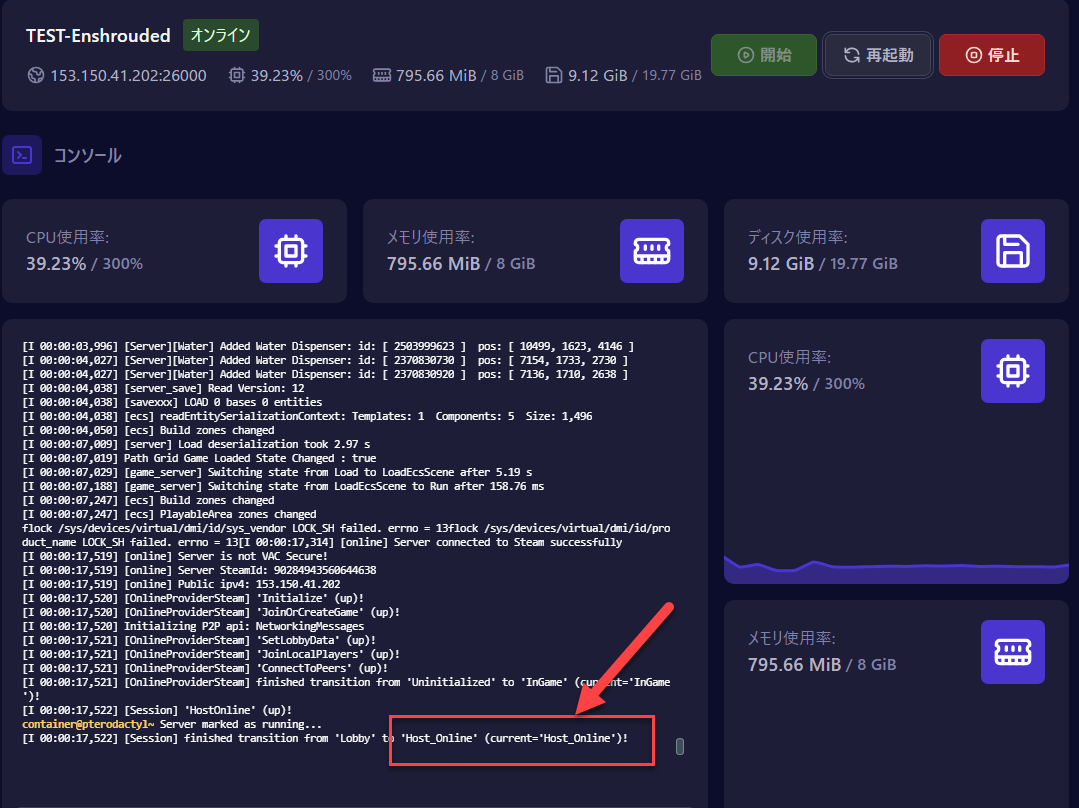
You can read the startup log on the Console tab in the game panel. [Session] 'HostOnline' (up)! means it started correctly.
I changed a difficulty multiplier and nothing happened
Check whether [DIFFICULTY] Game Settings Preset is set to something other than Custom (Default / Relaxed / Hard / Survival). The individual multipliers (GAME: PLAYER, GAME: ENEMY and so on) only apply when the preset is Custom.
After the restart, if the console shows [server] Game Settings 'Custom', your individual settings are in use. If it shows anything else, such as 'Default', the preset is not set to Custom.
I changed a variable and nothing happened
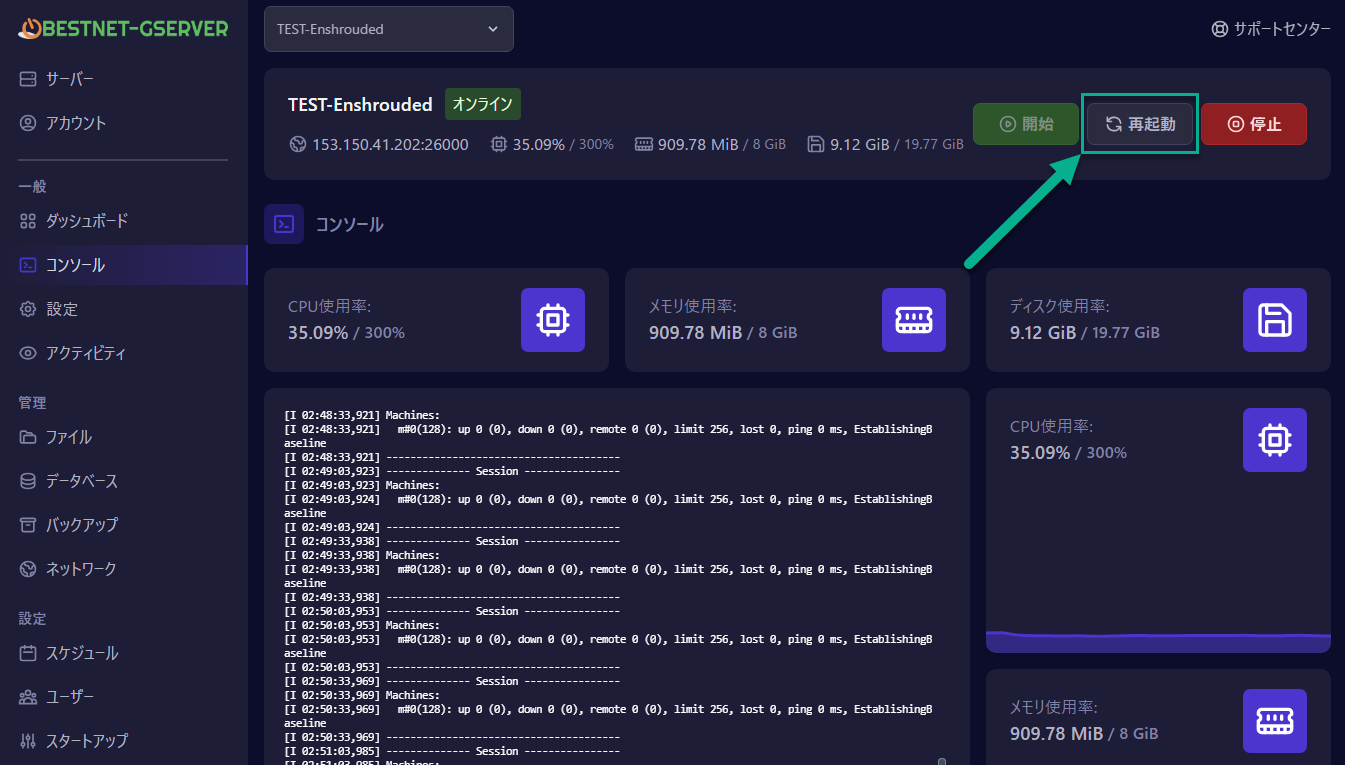
After changing a variable you must restart the server. Click the Restart button at the top of the game panel.
I want to go back to the original settings
Leaving an individual variable blank makes Enshrouded use its own default. To reset everything, clear all the multiplier variables and set [DIFFICULTY] Game Settings Preset to Default. On servers ordered before 2026-10-19 a cleared field can keep its previous value, so use this method to reset them.
How do I know the server started correctly?
When [Session] 'HostOnline' (up)! appears on the Console tab in the game panel, the server has started correctly and is waiting for players to connect.